How Many Comments Can You Leave on LinkedIn Per Day?
LinkedIn has never published a daily comment limit, and the numbers circulating have no source. What LinkedIn documents, what we run on our own account, and the shape that keeps it safe.

· 10 min read
On this page
Search for the LinkedIn comment limit and you get numbers. Thirty a day. A hundred. A hundred and fifty for an aged account, thirty-five for a new one, with a table breaking it down by account age and a warning about what happens if you go over.
Every one of those numbers has the same source, which is somebody’s experience plus somebody else’s article. LinkedIn has never published a daily comment limit, and the way its help pages are written suggests it never intends to.
That does not mean there is no limit. It means the question is worse than people think, and the honest answer is more useful than a number.
What LinkedIn actually says
Three things, and they are all worth reading in the original.
The first is the trigger. LinkedIn describes acting on “patterns that indicate your account is engaging in automated or otherwise inauthentic activity,” and gives an example: “sharing high volumes of messages, comments, posts, or other content in a short period of time.” Comments are named. Volume is named. A threshold is not, and neither is the length of that short period.
The second is the consequence, and it is not the one people expect. LinkedIn says it may “limit the visibility of your content or restrict your account.” Visibility comes first. Before anything stops you commenting, the comments you already left can simply stop reaching people, which is invisible from where you are sitting and looks exactly like a quiet week.
The third is escalation. A temporary restriction re-enables itself at the time given on the notification, and LinkedIn warns that repeated temporary restrictions may result in permanent restriction. Hitting a wall once is an inconvenience. Hitting it every month is a trajectory.
Why the number is not published
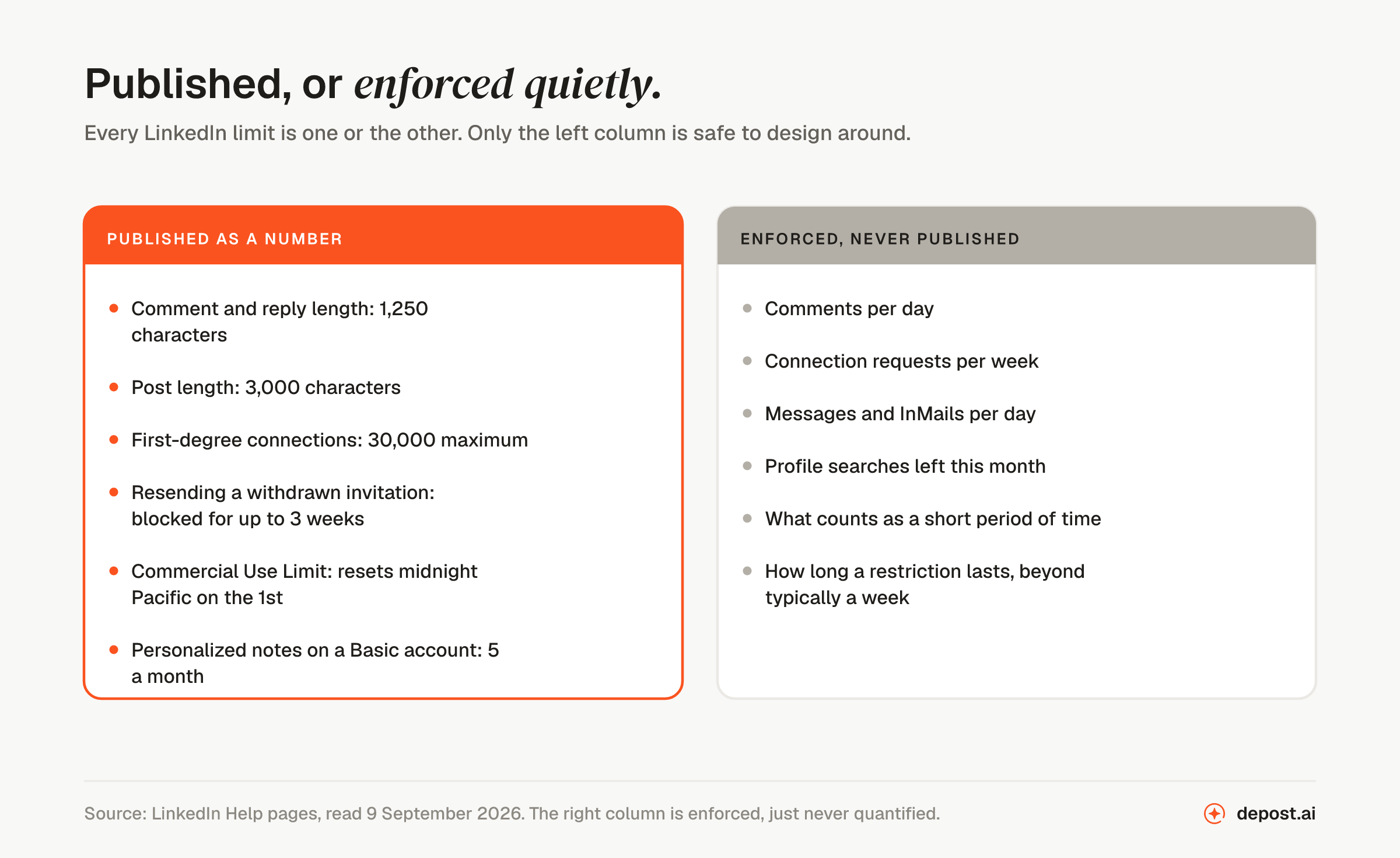
This is the same pattern as the connection request limit, where the famous “100 a week” is also not LinkedIn’s figure. LinkedIn’s help pages describe what triggers an invitation restriction and how long it lasts without naming a threshold anywhere.
The reason is straightforward. A published limit is a target. If LinkedIn said 100 comments a day, the tools that automate commenting would ship a setting called “99” that afternoon, and the number would have made the problem more efficient rather than smaller.
What is enforced instead is a pattern. Speed, repetition, similarity between one comment and the next, the hours it all happens in, and whether the account does anything else. That is why two people leaving forty comments on the same morning can get different outcomes, and why the tables of numbers you find online never quite reproduce.
| What people quote | Where it comes from |
|---|---|
| 30 comments a day | Screenshots of a restriction message, shared in 2025 and repeated since |
| 100 to 150 a day | Aggregated practitioner reports, no LinkedIn source |
| 50 likes, 50 endorsements a day | Third-party blog posts citing each other |
| No published limit | LinkedIn’s own help pages |
So how many comments per day is safe?
Higher than the internet thinks, and the honest version of the answer has two parts: what the platform tolerates, and what is worth your morning. They are different numbers, and most articles collapse them into one.
On the platform side, we run the Depost AI account at 50 to 100 comments a day, split across two or three sessions with a few hours between them. That has been the pattern for months, on an established account that also publishes, and we have never hit a restriction doing it. Fifty comments dropped into a single half hour is a different proposition entirely, and that is the part most warnings get backwards: they quote a total when the thing being measured is a rate.
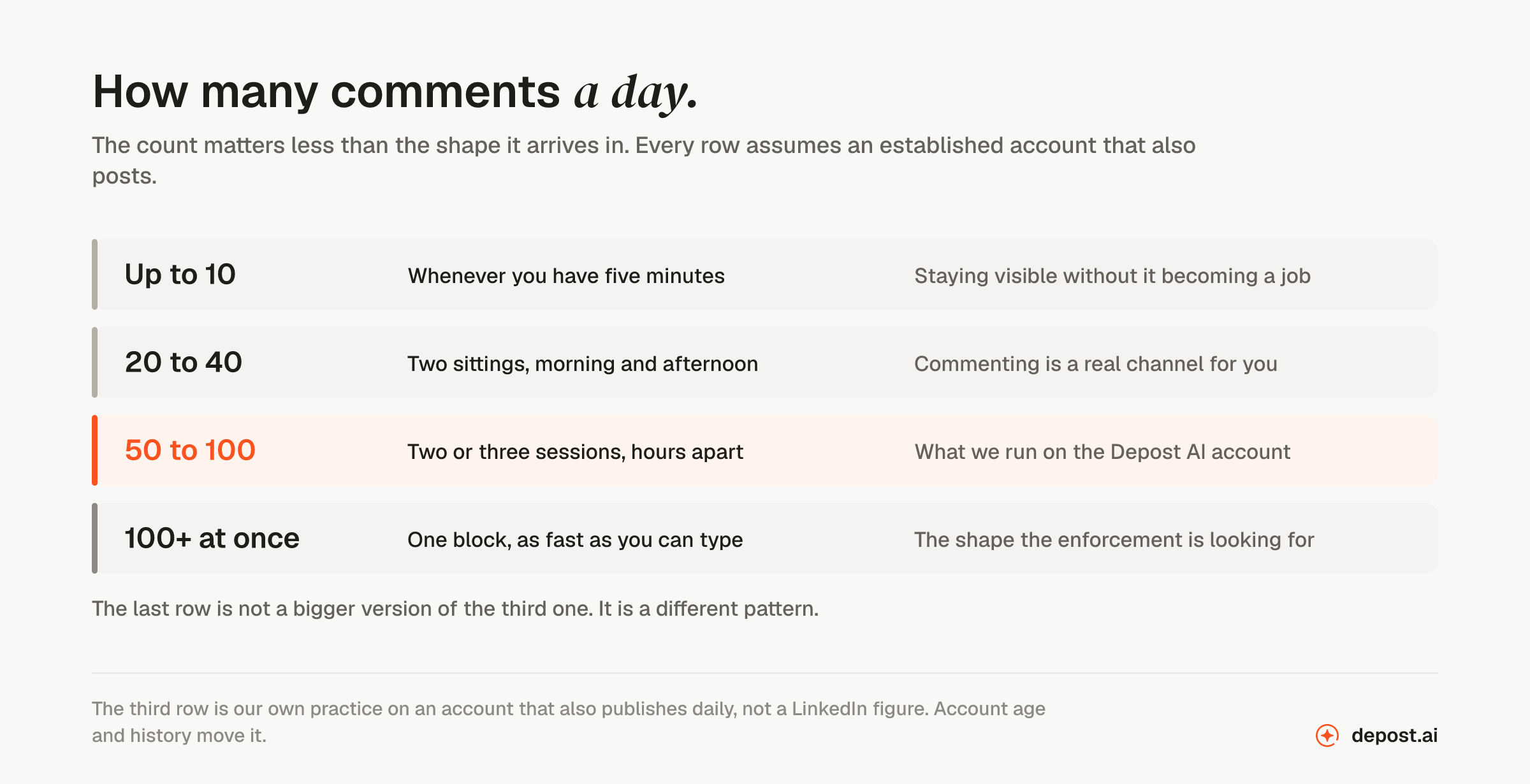
Read that as a ladder rather than a target. Almost nobody asking about the limit is anywhere near the top of it: the usual case is somebody doing eight comments a day and wondering whether it is safe to do more. It is, by a wide margin, provided the extra ones arrive spread out and say something.
Two or three sessions, hours apart
This is the part that does the work, so here it is in detail.
A session is twenty to forty comments in half an hour to forty-five minutes, and then you close the tab. Two of those covers a normal day. Three is a heavy one. The gap between them matters more than what happens inside them, because a gap is what turns a burst into a habit.
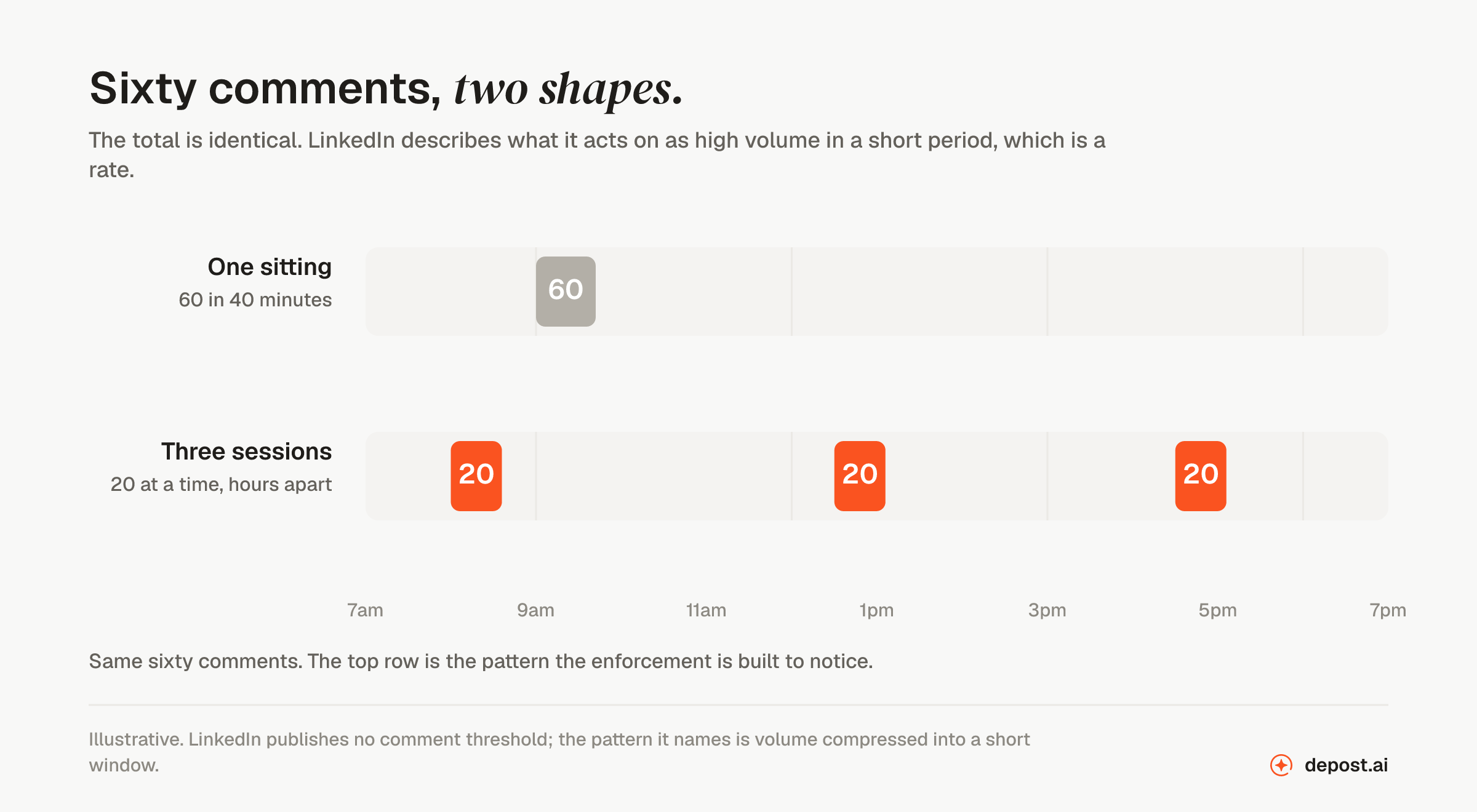
A working shape most people can hold:
- Morning session. Thirty minutes on the feed while it is still moving, on posts published in the last hour or two.
- Midday session. Shorter. Start it by answering the replies your morning comments collected, which is the cheapest conversation on the platform and the one most people skip.
- Late afternoon, if the day allows. Different accounts from the morning, so the same five names are not the whole of your activity.
Two rules that survive contact with a busy week. Spread the comments across the hours you are actually online, because activity that continues at a steady rate through the night is the clearest signal there is that a person is not doing it. And vary where they land: commenting on the same handful of accounts every day looks like an engagement pod, and LinkedIn names pods in its own enforcement language.
What actually gets you limited
If the ceiling is a pattern rather than a total, these are the parts of the pattern you control.
Bursts. Forty comments in twenty minutes is not a reading pattern, because nobody reads forty posts in twenty minutes. The same forty across a working day is unremarkable.
Repetition. Comments that are structurally identical are the easiest inauthentic pattern to detect and the easiest to produce by accident. “Great point, Sarah” fifteen times is a template whether or not you used one.
Automation that acts as you. This is the sharp edge. Software that signs in with your password, or borrows your logged-in browser session, and comments while you are asleep produces exactly the pattern the enforcement is built to catch, and everything it does is recorded as something you did. What gets an account restricted covers the mechanics.
Nothing else on the account. An account that only comments, never posts, and has a thin profile reads differently from one doing all three. The judgment is about the account, not the action.
The comments still have to be worth reading
Everything above is about the platform’s tolerance. Your own is the tighter constraint.
Past a certain point in a session the comments get shorter, more generic, and more agreeable, and a generic comment is worth approximately nothing: nobody clicks the name attached to “couldn’t agree more.” The reason to care about volume at all is that a comment only pays if somebody reads it and wants to know who wrote it, and that stops being true long before LinkedIn intervenes.
The published limit here is generous: 1,250 characters, the same for a reply as for a top-level comment. Almost no good comment needs half of it. What a good comment looks like has the specifics, and the character counter has the rest of the limits if you want to check a draft against them.
If the tiredness is the problem, drafting help keeps late comments from going generic without changing who posts them. The free AI comment generator turns a post and your take into three drafts, and the LinkedIn AI comment generator in Depost AI does the same on the post you are reading, in your voice, and leaves the posting to you.
What to do if you are already restricted
If commenting has stopped working, the notification tells you when it lifts, and waiting is the whole remedy. There is no appeal worth filing for a temporary limit and no support conversation that shortens it.
Do two things while you wait. Disconnect anything that comments on your behalf, because LinkedIn’s stated remedy for an automation restriction is to disable the software and let the account re-enable itself. And when it lifts, come back at half the rate you were running and rebuild from there, because a second restriction is the one that starts an escalation.
Other LinkedIn limits worth knowing
The same split runs through all of them. A short list of numbers LinkedIn publishes and expects you to work around, and a much longer list of thresholds it enforces without ever naming, for the same reason it does not name the comment one.
| Limit | Where it stands | More |
|---|---|---|
| Connection requests | No published weekly number. A restriction typically lasts a week | Connection request limit |
| Total connections | 30,000, published and fixed. Followers are unlimited | Connection limit |
| Messages and InMail | No daily cap for your connections. InMail is metered in credits | Message limit |
| Profile searches | Capped monthly for free accounts, and the number is never shown | Commercial Use Limit |
| Character counts | Published in full: 3,000 a post, 1,250 a comment, 220 a headline | Character counter |
Two of those change how you work even if you never go near the ceiling.
An InMail that gets a reply is free. LinkedIn returns the credit for any InMail accepted, declined, or responded to within 90 days of being sent, so only the ignored ones cost you anything. Your real monthly allowance is set by how relevant your messages are, not by which plan you bought.
Followers are uncapped, connections are not. The 30,000 limit applies to two-way connections only. At the cap, Follow quietly becomes the default button on your profile. The platform is telling you which of your two audiences can still grow.
FAQ
Is there a daily comment limit on LinkedIn?
Not a published one. LinkedIn enforces against high volumes of comments in a short period but has never stated a number, and the figures circulating online are practitioner estimates rather than policy.
How many comments per day is safe on LinkedIn?
More than most people think. We run 50 to 100 a day on our own account, split across two or three sessions with hours between them, and have never hit a restriction doing it. The same total in one sitting is a different pattern, and that is what gets accounts limited.
How long should a commenting session be?
Twenty to forty comments in thirty to forty-five minutes, then stop. Two sessions covers a normal day and three covers a heavy one. The gap between sessions is doing more work than anything inside them.
What happens if you comment too much on LinkedIn?
LinkedIn says it may limit the visibility of your content or restrict the account. The visibility case comes first and is invisible from your side: comments still post, but reach fewer people. A restriction re-enables itself automatically at the time given in the notification.
Does using AI to write comments risk a restriction?
Drafting with AI and posting the comment yourself is you commenting. Software that signs in as you and comments unattended is the pattern LinkedIn enforces against, and it is prohibited by the User Agreement regardless of how the text was written.
What other limits does LinkedIn have?
Thirty thousand connections, a monthly cap on profile searches for free accounts, InMail metered in credits that come back when someone replies, and published character counts for posts, comments, and headlines. The volume limits on invitations and messages are enforced without published numbers, exactly like the comment one.
How long is a LinkedIn comment allowed to be?
1,250 characters, including spaces, and the same limit applies to replies. It is one of the few LinkedIn limits published as a number.