How to Connect Claude to LinkedIn: Analyze, Plan and Write Posts From Your Own Numbers
Claude can read your LinkedIn analytics, find the shapes that beat your own average, draft a post in your voice and put it on your calendar. Here is the whole setup, including the morning it refused to write the post I asked for.

· 18 min read
On this page
Last Tuesday morning I asked Claude to write a LinkedIn post. It read my analytics, checked the finding the post rested on, told me the finding was carried by a single lucky post, and refused to write it.
Then it wrote the opposite post instead.
I did not expect to find that useful. I had asked for a post and got an argument instead, and the argument was right.
Below is the whole setup. How to connect an AI client to your own LinkedIn analytics, the five plain text files it reads before it writes, and what a real session looks like from the first question to a scheduled post. Connecting it takes about five minutes. Nothing in it posts by itself.
If you already know you want it and just need the steps, skip to Connect it. Everything before that is what the setup actually does once it is running.
What this actually is
Claude does not touch LinkedIn. It talks to Depost AI, and Depost AI holds the official LinkedIn connection.
That matters for three reasons. LinkedIn’s terms forbid tools that scrape pages or act on your account, so anything that drives linkedin.com in a browser is a risk to your account. The official API has no browser in it. And the analytics Claude reads are the ones LinkedIn reports to you, not numbers scraped off a page.
Three things it never does:
- It never posts something you have not read.
- It never touches LinkedIn directly.
- It never answers a comment or a DM.
A new key cannot publish at all. Publishing is a separate permission, off by default, and the product marks it high risk.
One morning, start to finish
Five questions. Every screenshot below is from the same session on my own account.
1. “Analyse my profile. What’s working and what isn’t?”
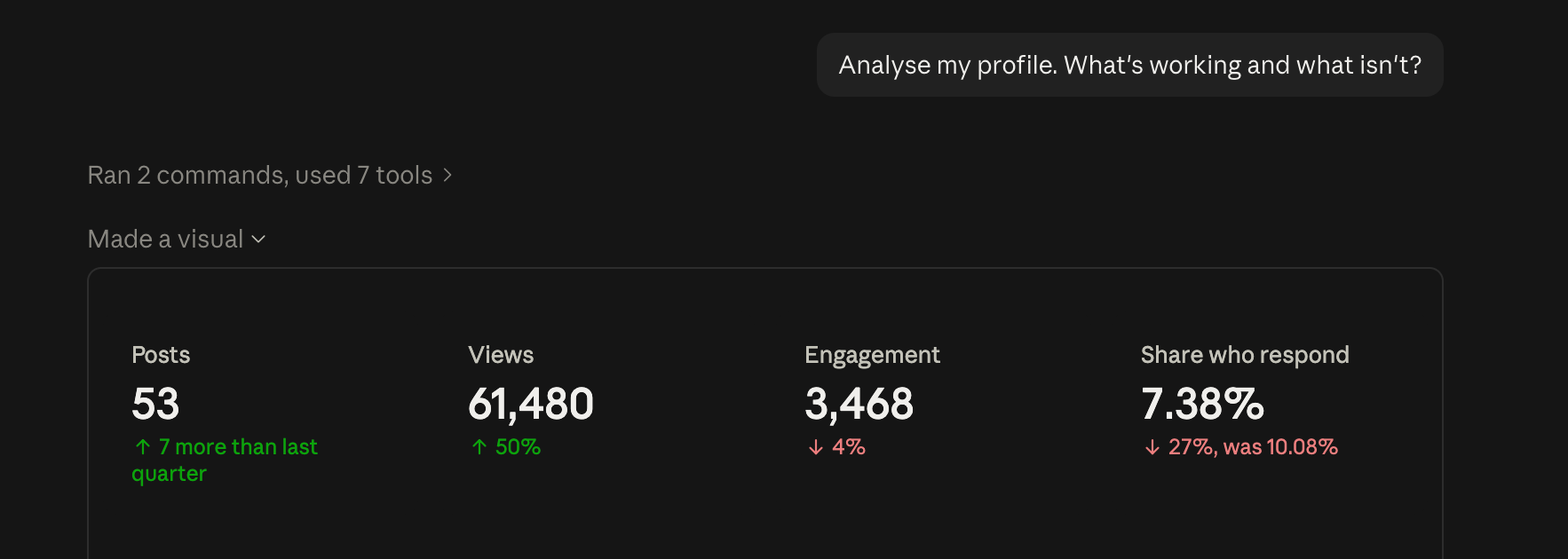
Reach up by half, and the share of readers who do anything down by a quarter. Two numbers that disagree, in the first five seconds.
Underneath that is the part I actually use. Every shape I publish, scored against my own typical post rather than against other creators. Comparing yourself to someone with a different sized audience tells you nothing you can act on.
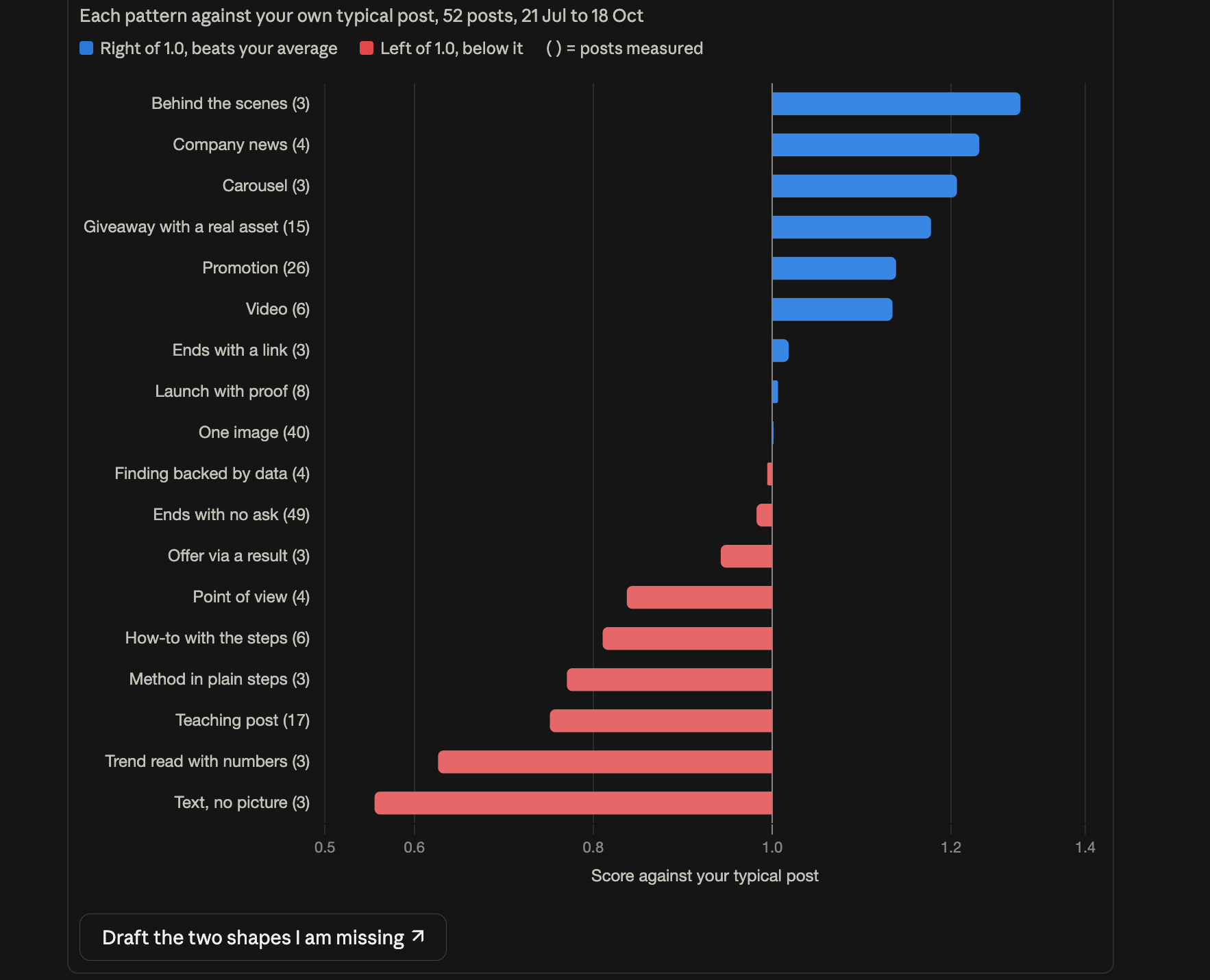
Behind-the-scenes posts at 1.28. Teaching posts at 0.75, across 17 posts. I had spent the quarter writing the second kind.
And then it talked me out of two of its own findings:

The dashboard says your best time is Monday 3pm, 2,473 views average. That is one post. Take the 5 October one out and Monday 3pm averages 796 views — completely ordinary. Don’t move your calendar for it.
A tool that tells you which of its own numbers to ignore is worth more than one that gives you twenty.
2. “Give me 5 post ideas based on what my numbers say works.”
Each idea came back in the same six fields: a draft first line, the shape, the number it rests on, the image, what only I can say, and the day to post it.
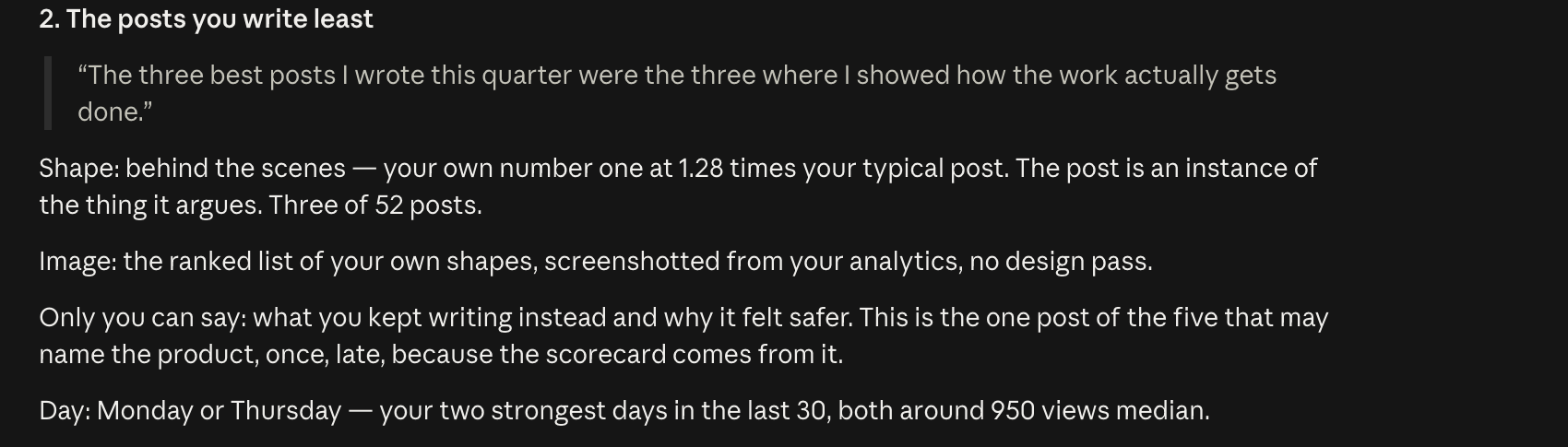
No idea arrived without a number under it. Two arrived with warnings attached.
3. “Create post on idea 2.”
Here is where it stopped.
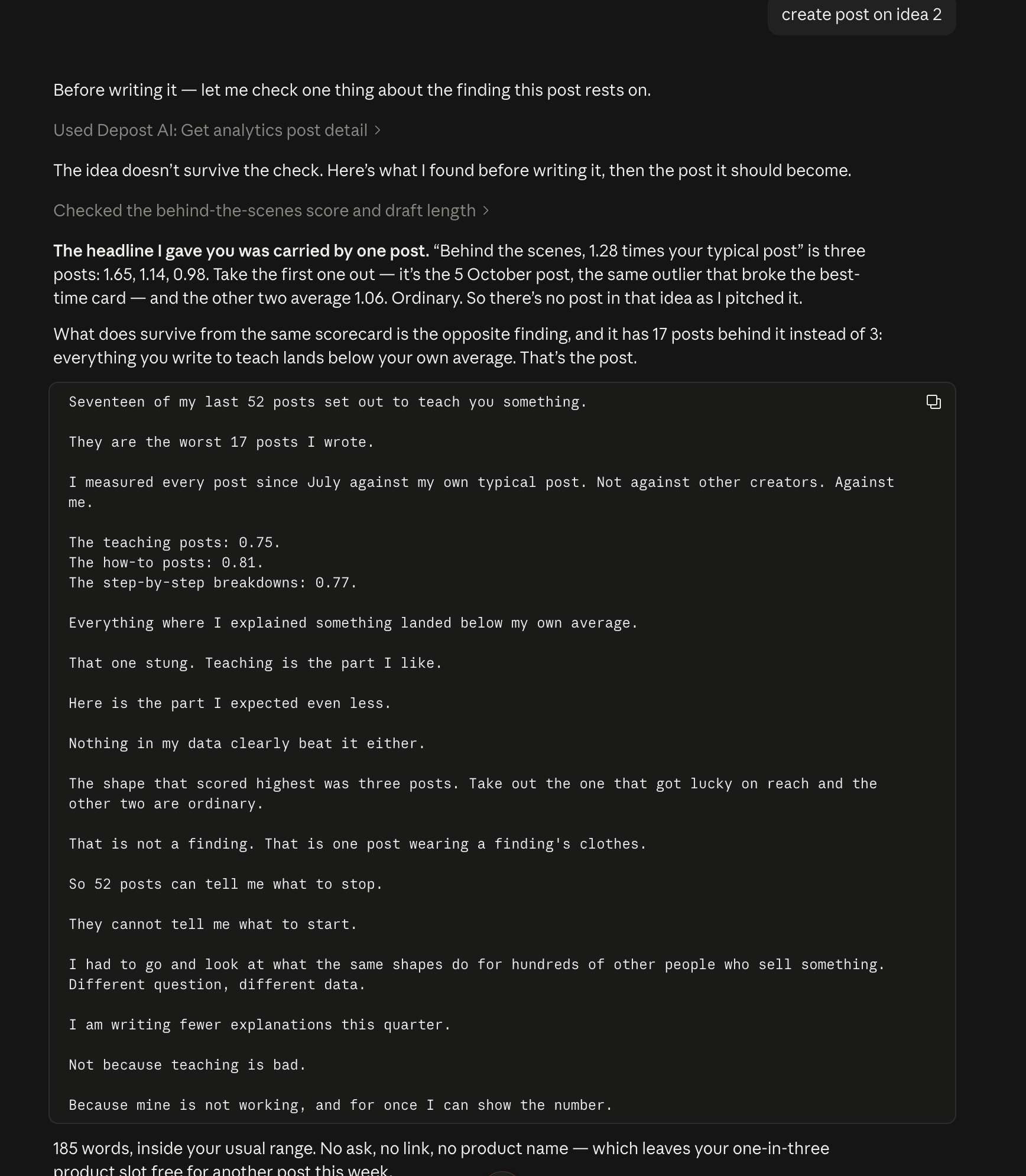
The headline I gave you was carried by one post. “Behind the scenes, 1.28 times your typical post” is three posts: 1.65, 1.14, 0.98. Take the first one out — it’s the 5 October post, the same outlier that broke the best-time card — and the other two average 1.06. Ordinary. So there’s no post in that idea as I pitched it.
Then it went and found the finding that did hold, the one with 17 posts behind it instead of 3, and wrote that post instead. 185 words, no link, no ask.
That exchange is the whole argument for giving an AI your real numbers. Without them it writes whatever you ask for, confidently. With them it can tell you the thing you asked for is not there.
4. “Create graphics from my latest branding look.”
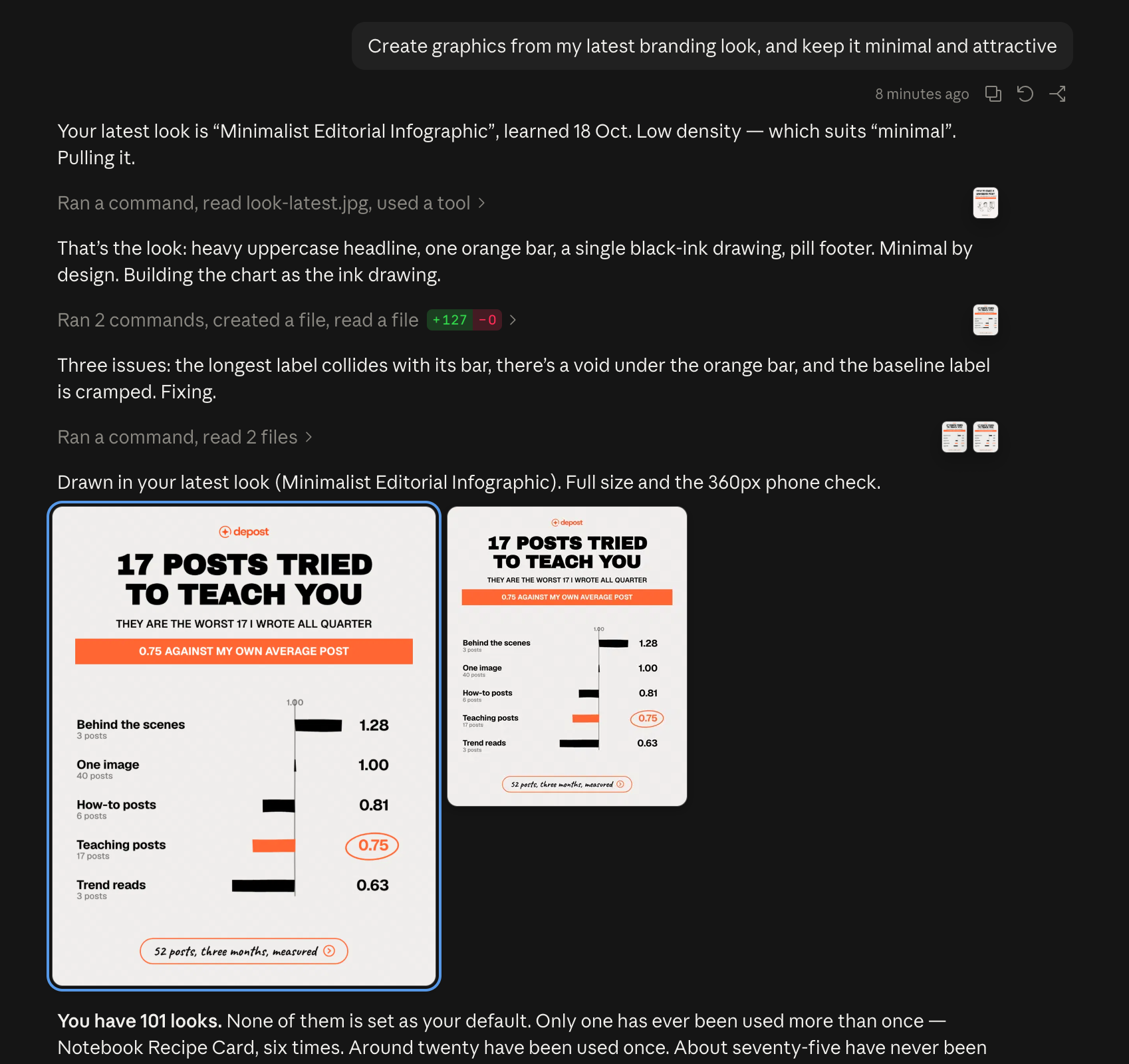
Three issues: the longest label collides with its bar, there’s a void under the orange bar, and the baseline label is cramped. Fixing.
It drew in a look learned from graphics I had already published, so the chart came out in my colours and my type rather than a generic AI style. Then it checked the result at 360 pixels, which is roughly what a card renders at in the LinkedIn app.
5. “Schedule it on my next available slot.”
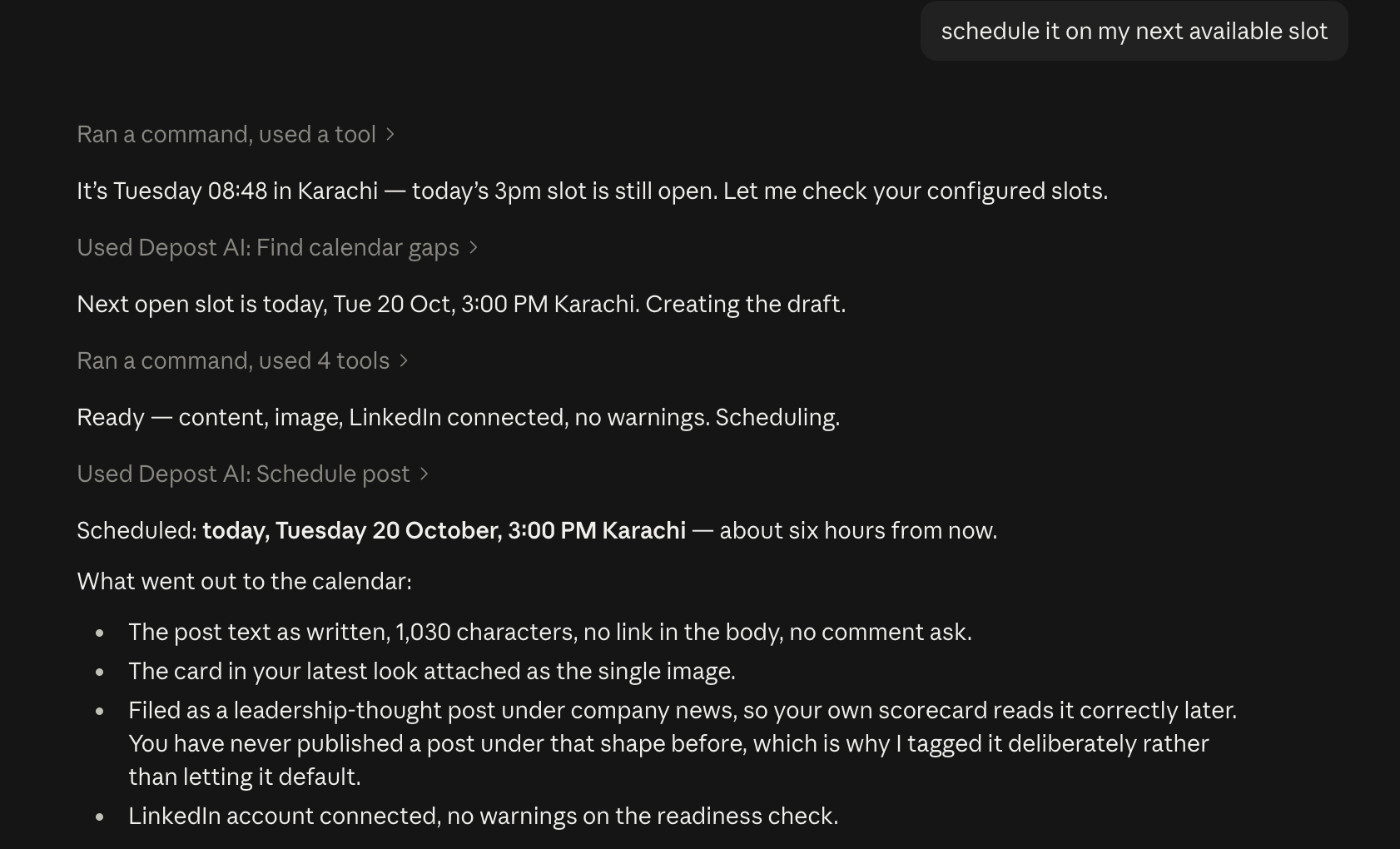
It found the open slot, ran the readiness check, scheduled it, then said exactly what it had done. Including that it had tagged the post’s shape on purpose rather than letting it default, so my own scorecard would read it correctly next quarter.
Five steps, and every one of them ended with me saying yes before anything moved. It has never once pressed the button on its own.
Connect it: five steps
You need two things. A free Depost AI account with your LinkedIn profile connected, and about five minutes. If you do not have one yet, start there and connect LinkedIn first, because an empty account gives the AI nothing to read.
1. Create a key. Open Settings → MCP in the dashboard, under Integrations, and click Create API key.
2. Pick the brand. One brand, or all brands in the workspace. Start with one. If you handle several clients, read the section below before you choose.
3. Tick the permissions. Four are already on: Context, Content knowledge, Analytics, Drafts. Leave the rest off for now. Leave Publishing off for your first week especially. Drafting is reversible. Publishing is not.
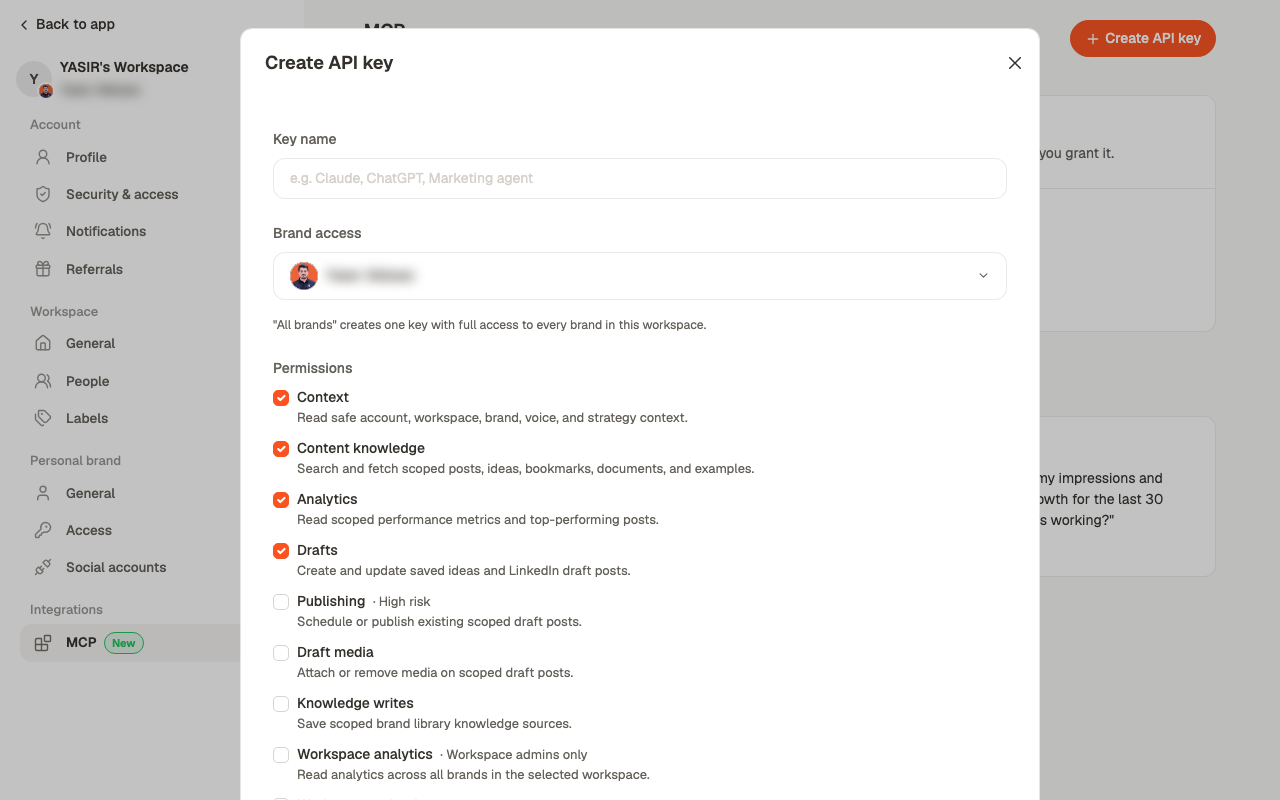
4. Copy the connection URL. This is the only time you will see it. The key is inside the URL, so there is no separate password to save.
5. Add it to Claude. In claude.ai, open Settings → Connectors and click Add custom connector. Name it Depost AI, paste the URL as the remote MCP server URL, and click Add. There is no authentication step. Start a new chat and the tools are there.
Every key carries its own setup instructions, with a tab for each client, so you never have to remember this:
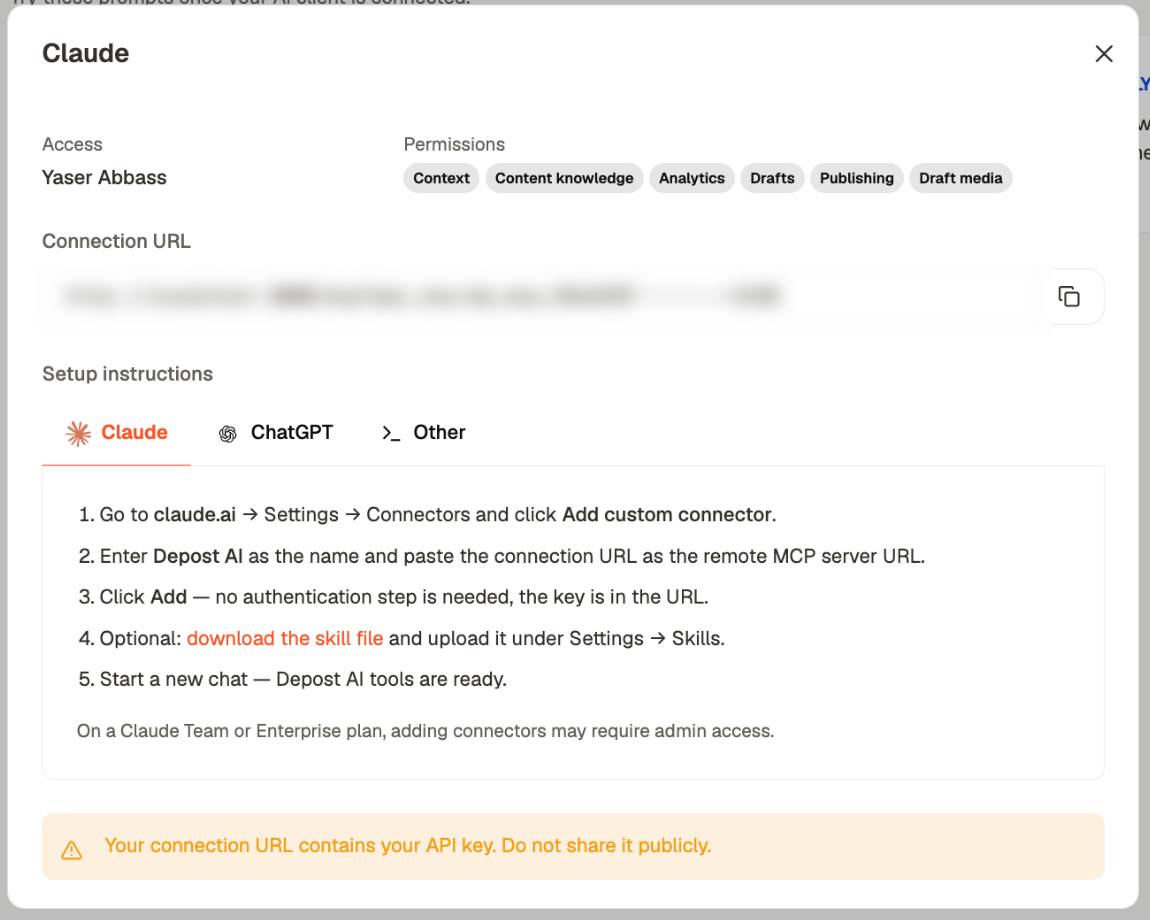
The connection URL contains your API key. Anyone holding it has whatever permissions you granted it. Treat it like a password. Never paste it into a shared doc, a ticket, or a screenshot.
On ChatGPT and other clients. The same URL works. In ChatGPT, open Settings → Connectors, create a connector, paste the URL, and choose No authentication. Any MCP-capable client works the same way.
Add the skill file. It is optional and it makes a real difference. Download it from Settings → MCP and upload it under Settings → Skills. Without it the client has the tools but no guidance, so it guesses. It asks you for brand names it could have looked up, or starts drafting before it has read your voice.
Both steps are documented in full if you get stuck: creating a connection and connecting your AI client.
What each permission opens
| Permission | What the client can do | On by default |
|---|---|---|
| Context | Read your brand, voice and strategy | Yes |
| Content knowledge | Search your posts, ideas, bookmarks, documents | Yes |
| Analytics | Read your performance and top posts | Yes |
| Drafts | Create and update ideas and draft posts | Yes |
| Visual | Read your looks, the shared look library, your brand kit | No |
| Leads | Read your lead lists and prospects | No |
| Publishing | Schedule or publish an existing draft | No |
| Draft media | Attach or remove images on drafts | No |
| Knowledge writes | Save sources to your brand library | No |
Tick Visual if you want step 4 of the session above, drawing in your own look. It reads. It writes nothing.
The five rule files
The connector gives the AI your numbers. These give it your judgement. They are plain text files in a folder the AI can read, and they are the difference between output that sounds like you and output that sounds like software.
You can also get these files in the skill download under Settings → MCP in Depost.
One file works. Five work better, because the AI reads only what the job needs: the voice file when drafting, the evidence file when choosing a shape, the never file every time.
| File | What it holds | Fill it from |
|---|---|---|
voice.md | How you actually sound | Three to five of your own posts |
evidence.md | What wins on your account | An analysis of your last three months |
strategy.md | Who you are for, what you sell | Your own head, ten minutes |
human.md | Every pattern that reads as machine-written | Ready to use as it is |
never.md | What must never go out | Mostly ready; add your own |
Start with human.md and never.md. Both work the moment you save them, with nothing to fill in. They stop the worst drafts.
voice.md
Paste in three to five of your own posts, then the rules that fall out of them: how long your sentences run, whether you use emojis, how you open, how you end.
Samples beat adjectives. Telling an AI you are “plain and direct” teaches it almost nothing. Three real posts teach it everything.
evidence.md
What wins on your account, not everyone’s. The shapes that beat your own average, the ones that lose, your openers, your endings, your best day, each with your own number beside it.
Of the five, this file changes the output most, and nobody can write it for you. It is also the reason the free analysis exists. Leave it empty and the AI has nothing to point at, so it guesses, and a guess in confident prose is the exact thing you were trying to get away from.
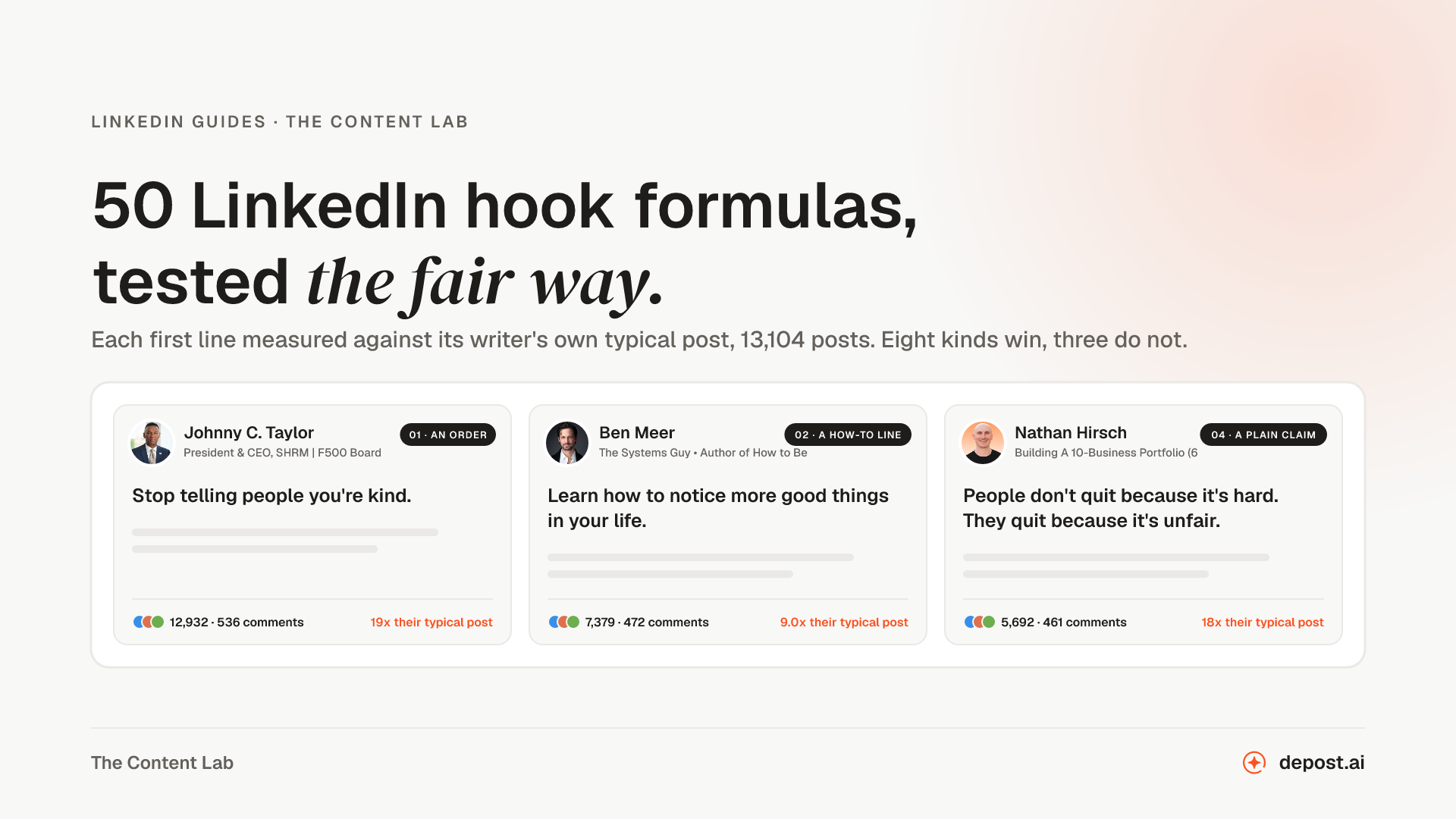
If you do not have enough history yet, start with other people’s numbers and label them as such. Scored against each writer’s own typical post, from 14 July to 11 October 2026: a vulnerable moment runs 1.21 (62 creators, 274 posts), a personal milestone 1.00 (81 creators, 272 posts), a trend read 1.02 (119 creators, 870 posts). At the other end, an offer highlight runs 0.69 (47 creators, 180 posts) and a webinar invite 0.62 (only 8% of 39 creators beat their own average, 145 posts). Openers in the same window: a how-to line 0.93 (35 creators, 185 posts), an order 0.87 (65 creators, 212 posts), a question 0.82 (120 creators, 555 posts) and last of eleven.
Endings, in the same window: nothing at all 1.15 (278 creators, 3,570 posts), a comment ask 0.96 (216 creators, 2,419 posts), a link 0.80 (only 31% of 205 creators beat their own average, 2,337 posts).
Replace every one of those with your own as soon as you have three months of posts.
strategy.md
Who you are for, what you sell, the topics you own, the topics you leave alone. Keep it short.
The point to get right: an audience line that describes millions of people produces output that could belong to anyone. “B2B founders” is not an audience. “Founders selling software to agencies, who post to get inbound and hate sounding like a brand” is.
human.md
The longest of the five, and the one that does the most work. Every word and pattern that makes a post read as machine-written, with the reason beside it so you catch the ones this list missed.
The vocabulary: delve, tapestry, unlock, landscape, realm, elevate, seamless, revolutionary, “in today’s fast-paced world”, and any headline built on “Unleash / Supercharge / Transform your X.”
The patterns, which matter more than the words:
- The tidy three-part lesson. Real experience rarely arrives in threes.
- The moral at the end. A post that restates its own point does not trust the reader.
- “It’s not X, it’s Y.” The most overused construction on the platform.
- The Named Concept. Inventing “The Clarity Loop” for a thing that needed a sentence.
- The rhetorical question as an opener. Measured last of eleven kinds, at 0.82 (120 creators, 555 posts).
- Lists where every item is the same length. Real thinking is lumpy. Perfect parallelism is a tell.
- Markdown that LinkedIn does not render. Asterisks for bold and dashes for bullets come out as literal characters on the page. Of everything on this list it is the most reliable giveaway, and almost nobody edits it out.
A note on the em dash, since it gets named as the great AI tell. We tested it. Across 16 answers to the same questions, one model used it in 7 of 8 and another in 0 of 8. So it is a tell for some models and not for others. The stray asterisks are the real one.
never.md
What must never go out, in your own words. The transferable core:
- No invented testimonial, logo, user count, revenue or performance figure.
- No customer’s name, post or number without their written yes.
- No capability your product does not have.
- No promise beyond what your onboarding actually delivers.
- No “comment X to get Y” unless the thing exists and you will send it by hand.
- Nothing you have not read yourself.
Running it for more than one client
This is where it stops being a personal setup. I run two connectors in one Claude session, my own account and my co-founder’s, and the AI cannot see one from the other.
Two ways to do it:
| One key per client | One workspace key | |
|---|---|---|
| Who it suits | Freelancers and agencies with a handful of clients | A workspace admin across many brands |
| What the AI sees | One brand. The others are unreachable. | Reads across every brand in the workspace |
| Naming the client | Not needed, the key is the client | Every write names the brand explicitly |
| Best for | Keeping client work genuinely separate | Cross-client reporting and calendars |
The separation is not a convention you have to remember. A key scoped to one brand cannot reach another brand’s analytics, drafts or voice, because the key does not carry the permission to.
One folder of rule files per client. Without this you get one voice wearing different facts, which clients notice faster than you would like:
clients/
  acme/        voice.md  evidence.md  strategy.md  human.md  never.md
  brightwave/  voice.md  evidence.md  strategy.md  human.md  never.md
human.md and never.md are the same everywhere, because they are about machines and about honesty rather than about the client. voice.md, evidence.md and strategy.md are entirely theirs. A client’s evidence file is built from their own analysis, so the shapes you propose to them come from their account, not from yours.
Cross-brand reporting. A workspace key adds three read tools: an analytics overview across brands, a post list across brands, and a calendar across brands. Each one can drill into a single brand when you want it to.
The honest limit: a workspace key gives whoever holds it read access to every brand in that workspace. If you are putting client work through this, that is the sentence to think about before you create the key. One key per client is the safer default, and it is what I use.
The ten-point check
Before anything goes on the calendar, every draft gets checked against this. It is the list that turns a draft into something you can send.
- Is there a number in it, and is the number true?
- How many posts does that number rest on? One is not a pattern.
- Could anyone else have written the first two lines?
- Is there a sentence only you could write?
- Does it match the voice file, or just the brief?
- Any banned word or pattern from
human.md? - Any stray asterisks or dashes that LinkedIn will print literally?
- Does it break anything in
never.md? - One ask, or none. Never two.
- Would you send this to someone whose opinion you care about?
The daily loop
Twenty minutes in the morning, five at night.
Morning. Ask what changed since yesterday. Ask for today’s draft against the shape your evidence file says wins. Read it. Fix the line that sounds like software. Schedule it.
Night. Ask how the day’s post did against your own median. If something surprised you, add it to evidence.md with the date beside it.
That file is the compounding part. After a quarter it stops being a starter kit and becomes a record of what works on your account, which is a thing no general-purpose AI can ever have about you.
What this produced
In three days across two accounts: seven posts, two research guides built from a library of 144,913 posts (the 30 post formats that win and 50 hook formulas), 44 charts, and a full analysis of my co-founder’s account.
Not one of them published itself.
FAQ
Is this allowed by LinkedIn?
Yes, because nothing here touches LinkedIn directly. Depost AI uses LinkedIn’s official API. What LinkedIn’s terms forbid is scraping and browser automation acting on your account, meaning tools that drive linkedin.com in a browser tab. There is no browser anywhere in this setup.
Does it post by itself?
No. A new key cannot publish at all; Publishing is a separate permission, off by default and marked high risk. Even with it on, scheduling is something the AI does when you tell it to, on a draft you have read.
Do I need Claude specifically?
No. ChatGPT works, and so does any MCP-capable client. Claude is what I use.
What if I have no posting history?
Then evidence.md has nothing true to point at, and that is the honest limit of this setup. Start with the labelled defaults above, write for a quarter, then run the analysis and replace them. The free analysis needs no card.
What does it cost?
The analysis of your own posts is free. The connector comes with a Depost AI account.
Can a client’s data leak into another client’s posts?
Not through the connector. A key scoped to one brand cannot read another brand’s anything. The one to be careful with is a workspace key, which reads across every brand in the workspace by design. See the section above.
Start here
You need three things, in this order: your numbers, a voice file, and the two rule files that stop bad drafts.
Run the free analysis on your last three months, fill evidence.md from what comes back, and paste three of your own posts into voice.md. That is an afternoon, and it is the whole difference between an AI that writes about your topic and one that writes like you about your numbers.