Does ChatGPT Watermark Text? What We Found in 16 Answers
Does ChatGPT hide a watermark in the text it writes? What OpenAI says, where the hidden character rumor came from, what we found in 16 copied answers from ChatGPT and Claude, and what actually comes along when you paste a draft into LinkedIn.

· 10 min read
On this page
- Does ChatGPT watermark text?
- Where the hidden character rumor came from
- Does ChatGPT add hidden characters? We checked 16 answers
- What actually comes along when you copy from ChatGPT
- Does Claude watermark text?
- How text watermarks work
- Is there a ChatGPT watermark detector?
- How to remove hidden characters from ChatGPT text
- Should you hide that a post was drafted with AI?
- FAQ
You draft a LinkedIn post in ChatGPT, paste it in, and wonder whether something in the text marks it as AI: a pattern, an invisible character, something a detector or a colleague could find.
We checked. We asked ChatGPT and Claude for the same eight LinkedIn posts, recorded exactly what their copy buttons put on the clipboard, and looked for every hidden character there is. Here is what OpenAI says, what we found, and what actually travels with a pasted draft.
Does ChatGPT watermark text?
Not yet, by OpenAI’s own account. Its help page on provenance signals lists what carries a watermark today: images made with ChatGPT carry Content Credentials and a SynthID watermark, and generated audio carries SynthID. Text is not on the list.
The same page says OpenAI’s goal is to extend these signals to all kinds of content, text included, in line with its commitments under the European Commission’s Code of Practice on Transparency of AI-generated content. So the honest answer for September 2026 is: no text watermark today, one announced as a goal.
OpenAI does have a method. In an August 2024 update to its content provenance post, OpenAI said its teams had developed a text watermarking method that was highly accurate and held up against paraphrasing. It chose not to ship it, for two reasons it gave: the mark was easy to get around by translating the text or rewording it with another model, and it risked stigmatizing people who use AI as a writing aid, such as non-native English speakers.
Images are different. A picture made in ChatGPT carries Content Credentials in the file and a SynthID watermark in the pixels, and the Content Credentials are why LinkedIn shows a CR tag on it.
Where the hidden character rumor came from
In April 2025, Rumi reported that longer answers from OpenAI’s o3 and o4-mini models contained narrow no-break spaces, characters that look exactly like a normal space, and suggested they were a watermark. OpenAI said they were not a watermark but a side effect of how the models were trained, and later output stopped showing them.
The story stuck, and it is why people still search for a “ChatGPT watermark remover” for text. It is also why we wanted to check today’s output rather than repeat last year’s.
Does ChatGPT add hidden characters? We checked 16 answers
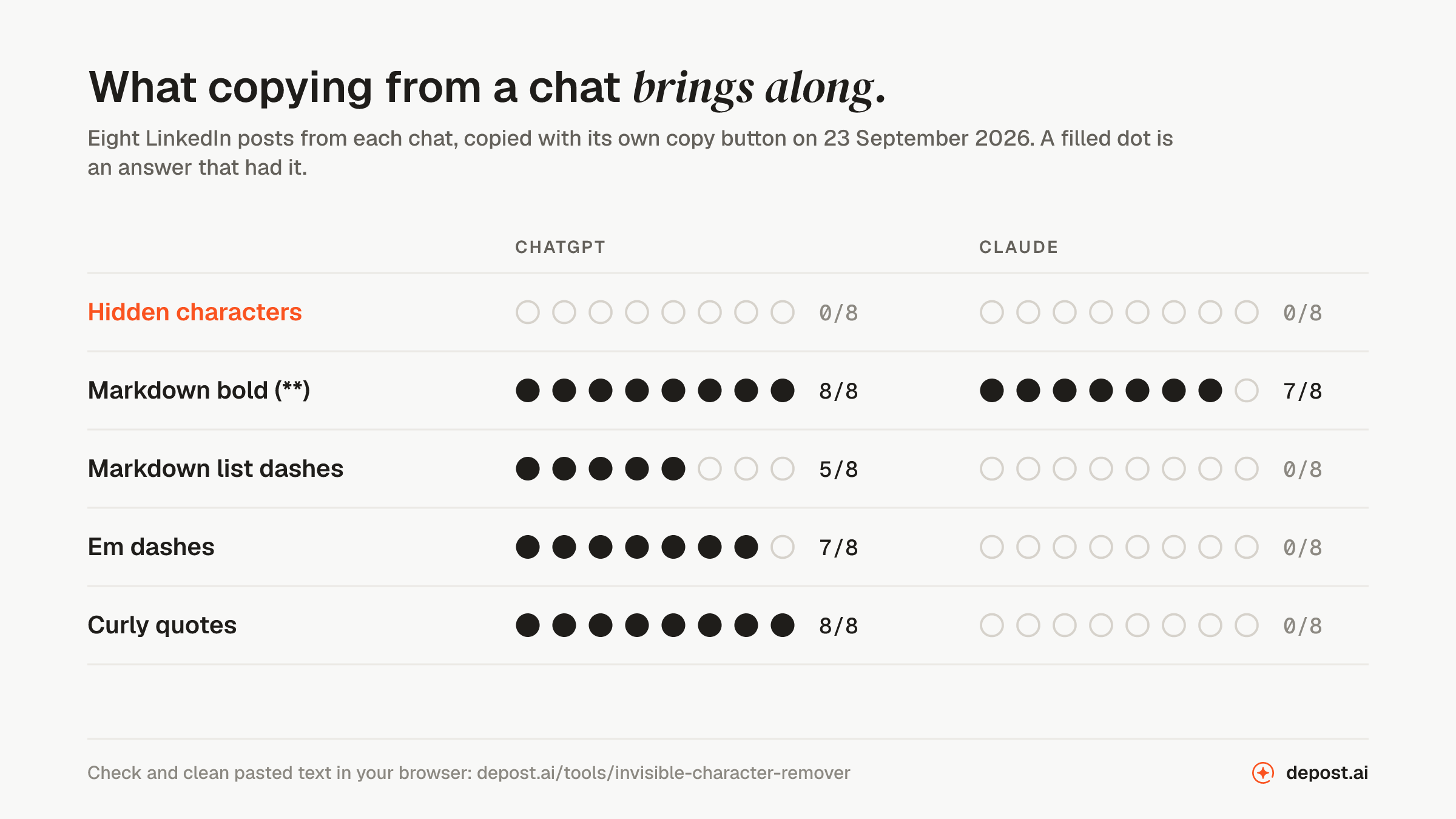
On 23 September 2026 we sent the same eight prompts to ChatGPT, in a temporary chat on its default model, and to Claude, in an incognito chat on Opus 5.5. All eight asked for LinkedIn content: an announcement with a list, tips with bullet points, a short story post, a post with statistics, a welcome post, a carousel outline, a pros and cons post, and a rewrite of a funding announcement.
For each answer we recorded what the copy button put on the clipboard and the text shown on screen, then counted every hidden character: zero-width spaces and joiners, no-break and narrow no-break spaces, soft hyphens, byte order marks, direction marks, tag characters, and stray variation selectors.
| In the copied text | ChatGPT | Claude |
|---|---|---|
| Hidden characters | 0 of 8 | 0 of 8 |
Markdown bold (**) | 8 of 8 | 7 of 8 |
| Markdown list dashes | 5 of 8 | 0 of 8 |
| Em dashes | 7 of 8 | 0 of 8 |
| Curly quotes | 8 of 8 | 0 of 8 |
Not one hidden character in 16 answers, on the clipboard or on screen. The only non-printing character anywhere was the selector inside a ❤️ emoji in one Claude answer, which is part of the emoji. Eight answers from each is a small sample from one day, so read it as a snapshot of September 2026, not a rule for every model.
What actually comes along when you copy from ChatGPT
The copy button is where the surprises are. Both chats write in Markdown, where **two asterisks** make a phrase bold and a dash starts a list item, and both copy buttons hand that Markdown over as the plain text version of what you copied. They also put a formatted version on the clipboard, and the app you paste into decides which one it takes.
LinkedIn does not read Markdown. Wherever the plain text version lands in a post, the asterisks and dashes show as they are. That gives a pasted draft away far more plainly than any watermark could.
The other differences were in the punctuation. ChatGPT used em dashes in seven answers out of eight and curly quotes in all eight. Claude used neither, and wrote its lists with • bullets rather than Markdown dashes. None of that is hidden, and none of it is a watermark. The swap option in the remover replaces the dashes and quotes if you want plain ones.
Does Claude watermark text?
Yes, for new models. In August 2026 Anthropic announced that text from Claude models launched on or after 2 August 2026 carries a watermark, with older models following over the coming months. It is done to meet the EU AI Act, whose marking rules for AI-generated content apply from that date, and Anthropic says the other major developers who signed the same code will add their own.
Anthropic is specific about what the watermark is not: nothing is added to the text, and there are no hidden characters, which matches what we found.
Two more details from the same announcement. Code carries less of the watermark, because code has fewer free word choices, though comments inside it can carry it. And files Claude produces, such as PNG, JPG, and SVG images, get C2PA Content Credentials in their metadata, the same kind of record that makes LinkedIn show a CR tag on an image.
How text watermarks work
A text watermark lives in the wording. Each time a model picks the next word, it usually has several that would do equally well. A watermarked model settles those small choices with a secret key instead of pure chance, which leaves a statistical pattern across a long enough passage. Anyone with the key can measure it; no reader can see it.
Claude’s method is a version of SynthID-Text, which Google DeepMind published and which Google uses in Gemini. Because the signal is in which words were chosen, removing characters, fixing punctuation, or converting Markdown does not touch it. Anthropic says light editing probably will not remove it completely, and a complete rewrite in your own words will, at which point the text is arguably no longer AI-written.
It is also different from an AI detector. A detector guesses from style, the phrasing habits models tend to share, without any key. A watermark check needs the key, and for Claude that check is currently a detection API in private preview for regulators, researchers, and other eligible organizations.
Is there a ChatGPT watermark detector?
Not for text, because there is no ChatGPT text watermark to detect yet. What exists today checks for other things:
| Tool | What it checks |
|---|---|
| OpenAI Verify | OpenAI’s watermarks and Content Credentials in images and audio |
| Anthropic’s detection API | Claude’s text watermark, in private preview for regulators, researchers, and other eligible organizations |
| A hidden character checker | Invisible characters in any text, whatever put them there |
| An AI content detector | Writing style, as a guess, with no key and no certainty |
A site that promises to detect a “ChatGPT watermark” in text is really doing one of the last two. Ours are the invisible character remover for hidden characters and the AI content detector for style, which quotes the lines that read as generated instead of giving a percentage.
How to remove hidden characters from ChatGPT text
If you came here for a ChatGPT watermark remover for text: there is no watermark in the characters to remove, and no tool can remove a watermark that lives in word choice. What you can clean are the hidden characters a draft picks up on the way. Web pages use no-break spaces and soft hyphens to control line breaks, word processors add their own, and they come along with anything you copy.
- Paste the draft into the invisible character remover. It checks the text in your browser, with nothing uploaded.
- Read the count. Every hidden character is listed by name, and a marked copy of your text shows where each one sits. Joiners that hold an emoji together are kept and listed as kept.
- Check the Markdown box if the draft came from a copy button. Bold becomes the bold letters LinkedIn keeps, headings become bold lines, and list dashes become bullets. There is a separate box for em dashes and curly quotes.
- Copy the text and paste it into LinkedIn.
The same check runs inside the character counter and the post preview: paste a draft with hidden characters and they offer to remove them.
In Microsoft Word, Find and Replace can do part of it: ^s finds no-break spaces, and ^u followed by a character’s decimal number finds the rest, such as ^u8203 for a zero-width space and ^u8239 for a narrow no-break space. Replace each with a normal space or with nothing. It works once you know which characters are there, which is what the checker tells you.
Should you hide that a post was drafted with AI?
Cleaning the characters and the Markdown is about the post reading properly. Asterisks in a LinkedIn post look like a mistake, whoever wrote it.
Hiding that a post was drafted with AI is a different question, and the tools will not settle it for you. Watermarks that live in word choice cannot be cleaned out, detectors judge the wording, and readers judge it too. What works on LinkedIn is a post that sounds like you: your examples, your numbers, your opinion. If a model helped, rewrite its draft until that is true, and it stops mattering where the first version came from.
FAQ
Does ChatGPT leave a watermark when you copy and paste?
Not in the text, as of September 2026. OpenAI lists watermarks for ChatGPT images and audio but not text. In our test of eight ChatGPT answers, the copied text had no hidden characters. It did carry Markdown asterisks and dashes, which show up as plain symbols in a LinkedIn post.
Can you tell if ChatGPT wrote something?
Not from a watermark in ChatGPT’s text, because there is none yet. AI detectors guess from the wording, and people notice patterns like Markdown symbols, heavy em dash use, and generic phrasing. What reliably changes that is editing the draft into your own words.
Does ChatGPT watermark code?
No. OpenAI lists no watermark for text of any kind, code included. Claude’s text watermark does reach code, but lightly: code leaves the model few free word choices, so most of the mark sits in comments.
Does Claude watermark text like Gemini?
Yes. Since August 2026, text from new Claude models carries a watermark based on SynthID-Text, the same family Google uses in Gemini. Both work through word choice, with no hidden characters, so no character cleaner removes them.
Do ChatGPT images have a watermark?
Yes. Images made with ChatGPT carry C2PA Content Credentials in the file and a SynthID watermark in the pixels. LinkedIn reads the Content Credentials and shows a CR tag, which the AI metadata remover can remove. The SynthID watermark stays in the picture.
How do I remove the asterisks from ChatGPT text?
Paste it into the invisible character remover and check the Markdown box. Bold phrases become Unicode bold letters, which LinkedIn keeps, and headings and list dashes are converted too. The LinkedIn text formatter does the same bold by hand.
Will OpenAI add a watermark to ChatGPT text?
It says so. OpenAI’s help page names text as part of its goal to expand provenance signals, citing the EU’s Code of Practice on AI-generated content. When it arrives, expect it to work like Claude’s and Gemini’s watermarks, through word choice.