The LinkedIn CR Tag: What It Means and How to Remove It
The CR tag on a LinkedIn image means the file carries Content Credentials. What they say, which tools add them, how to check an image before you post, and how to remove the CR tag without losing quality.

· 7 min read · Updated
On this page
You upload an image you made in ChatGPT, LinkedIn shows a notice that says “Content Credentials label added”, and once the post is live a small CR icon sits in the corner of the picture. Click it and LinkedIn tells your network where the image came from, including that AI made it.
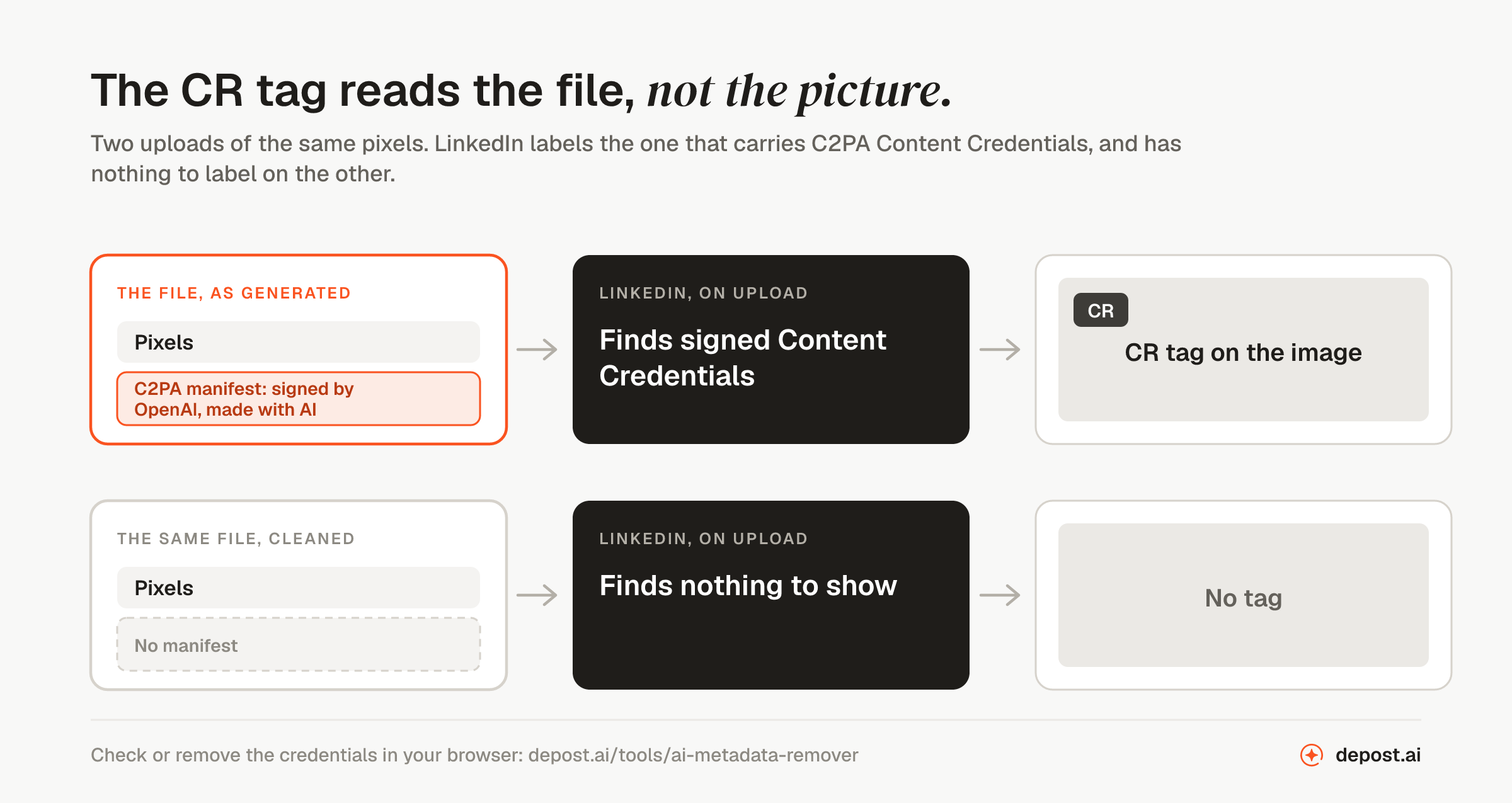
The tag is not LinkedIn looking at your picture and deciding it looks generated. It is LinkedIn reading a note that the generator left inside the file, which means you can check for it before you post and remove it.
What the CR tag on LinkedIn means
CR stands for Content Credentials. LinkedIn’s help page on Content Credentials explains that it adopted C2PA, an industry standard for recording where a piece of media came from, and that images and videos “cryptographically signed using C2PA Content Credentials” get the icon.
Clicking the tag opens a panel with what the credentials say. LinkedIn lists what it can show:
- An assertion about the media: whether AI was used to generate or edit any part of it.
- The app or device used: the AI tool, or the camera model for a photo.
- Created by: the person who generated it, when the credentials name one.
- Issued by: who created and signed the credential.
- Issued on: the date and time it was signed.
Two things follow from that page. The tag is not only for AI: LinkedIn’s own examples include photos captured by cameras and stories from news organizations. And LinkedIn says plainly that it cannot yet identify and label all AI-generated content. It labels what arrives with credentials attached.
Why the CR tag appears on your image
The credentials are saved inside the image file, next to the picture, the same way a phone photo stores the camera it was taken with. You cannot see them by looking at the image, but LinkedIn reads them the moment you upload it, and that is when the “Content Credentials label added” notice appears.
Which tools write them in:
| Tool | Adds Content Credentials |
|---|---|
| ChatGPT and the OpenAI image API | Yes, per OpenAI |
| Claude, for the image files it creates | Yes, per Anthropic, since August 2026 |
| Adobe Firefly | Yes, per Adobe |
| Adobe Photoshop and Lightroom | When Content Credentials are turned on at export |
| Some cameras and phones | Yes, on photos they sign |
| A screenshot of the image | No, a screenshot is a new file |
When we tested a portrait made in ChatGPT, the PNG it downloaded as carried credentials signed by “OpenAI Media Service API”, marked as made with AI. That is exactly what LinkedIn would have shown behind the tag.
How to check if an image has Content Credentials
You can see what a file carries before LinkedIn does. Drop it into the AI metadata remover. It reads the file in your browser, without uploading it anywhere, and lists what is inside:
- Content Credentials, and who signed them
- Whether they mark the image as made or edited with AI
- EXIF data such as the camera, and any GPS location
- Prompts and settings some AI tools write into PNG files
For an image made with ChatGPT, OpenAI Verify is a second check: it looks for OpenAI’s own Content Credentials and SynthID watermark.
If there are no credentials, LinkedIn has nothing to show a CR tag for, and you can post the original as it is. Nothing has to be downloaded to check.
How to remove the CR tag from a LinkedIn image
- Drop the image into the AI metadata remover. JPG, PNG, WebP, MP4, and MOV all work, several at once.
- Check what it found. The card under each file lists what was removed, and reads the cleaned file back to confirm nothing is left.
- Download the clean copy and upload that one to LinkedIn. No credentials, no tag.
The tool cuts the metadata out of the file rather than saving the image again, so the pixels, the color profile, and a photo’s rotation stay exactly as they were. For a PNG, re-saving would be lossless anyway. For a JPEG, it is not: in our test, saving a C2PA-signed photo again at quality 90 changed 13.6% of its pixels.
LinkedIn reads the file when you upload it. For a post that is already live, the dependable fix is to post the clean image again.
A carousel is a PDF, and a PDF carries details of its own: the author name, the app that made it, and the dates. The PDF metadata remover takes those out the same way, without changing the pages.
What removing the CR tag does not remove
Removing the credentials removes the note, not the facts behind it.
- It does not remove watermarks in the pixels. OpenAI says ChatGPT images carry a SynthID watermark alongside Content Credentials, and Google uses SynthID too. Those live in the picture itself, and no metadata tool touches them. OpenAI Verify may still find the watermark in a ChatGPT image after its metadata is gone, even though LinkedIn shows no tag.
- It does not remove visible marks. A logo or badge drawn onto the image has to be cropped.
- It does not make an AI image a photo. If it matters to your reader that an image was made with AI, a line in the post says so better than any tag.
Should you remove the CR tag?
Sometimes the tag helps you. A photographer whose camera signs their work, or a newsroom posting verified images, wants the credentials to stay: the tag is the proof.
For a post graphic, an infographic, or an illustration, the tag mostly invites the wrong question. Readers click it expecting a verdict on whether the content is trustworthy, and get a note about the tool the chart was drawn in. Removing it is reasonable there, and so is saying in the post that you made the graphic with AI.
Your profile photo is a separate case with the same logic: if you generated it, the profile picture resizer exports a fresh square with no metadata at all.
FAQ
What does “Content Credentials label added” mean on LinkedIn?
It means the file you uploaded carries Content Credentials, and LinkedIn will show the CR icon on it once you post. It is not a warning and nothing is wrong with your post. To post the image without the label, remove the credentials from the file and upload the clean copy instead.
What does CR mean on LinkedIn?
CR stands for Content Credentials. LinkedIn shows it on images and videos that carry a signed C2PA record, which says what made the file and whether AI was involved. Clicking it shows the app or device, who issued the credential, and any statement about AI use.
Does the CR tag mean LinkedIn detected AI?
No. It means the file arrived with Content Credentials attached, and LinkedIn is displaying them. LinkedIn’s own help page says it cannot yet label all AI-generated content. An AI image without credentials gets no tag, and a camera photo with credentials does.
Why does my ChatGPT image show a CR tag on LinkedIn?
ChatGPT images carry C2PA Content Credentials signed by OpenAI, which record that the image was made with AI. LinkedIn reads them on upload and shows the tag. Removing the credentials from the file before you post removes the tag.
How do I remove the CR tag from a LinkedIn post that is already published?
LinkedIn reads the credentials from the file you uploaded, so the reliable way is to clean the image, then post it again. Check the new file first to confirm no credentials are left.
Does removing Content Credentials reduce image quality?
Not if the metadata is cut out of the file, which is how the AI metadata remover works: the pixels are identical afterward. Re-saving the image also removes it, and costs nothing for a PNG but changes pixels in a JPEG or WebP.
How do I remove CR from a ChatGPT image?
Drop the image into the AI metadata remover and download the clean copy. It removes the credentials OpenAI signed into the file, and leaves the picture exactly as ChatGPT made it.
Can I remove CR from a video?
Yes. LinkedIn shows the tag on videos with Content Credentials too. The same tool removes them from MP4 and MOV files without re-encoding the video.