On this page
Supergrow starts with a conversation. You answer an AI interview or record a voice note, Supergrow shapes a draft in your Content DNA, and the post moves across a board from draft to scheduled, with its first comment going out when the post does.
It is a good tool for writing, and every step in it waits for you to start it. If you want next week planned from your own LinkedIn results, a graphic with each post, replies drafted for the people you want to reach, or room for more than five accounts, you are looking for something that works around the draft as well. Eleven tools, then, starting with ours. What each one covers, and what you would be giving up. If you are choosing from the whole category and not replacing one product, the 15 best LinkedIn AI tools is the wider list.
Three questions that sort the list fast
People on Supergrow start looking for an alternative when one of these three answers stops fitting.
Who starts the week, you or the tool? In Supergrow, a post begins when you start an interview, record a voice note, type a topic, or add a source. A tool that plans for you begins from your own results and brings you a week of ideas to approve. The first suits people who like to talk through every post. The second suits people who would rather approve a plan than start each post.
Does it plan from your own numbers? Supergrow shows your impressions, engagement, and follower growth, and leaves the next decision to you. A tool that reads the same numbers and turns the posts that beat your average into next week’s ideas saves that step every week.
What happens after the fifth account? Supergrow’s Teams plan includes five accounts. More than five is its Enterprise plan, priced by request. An agency, or a company with more than five people posting, should check how each tool adds the sixth account and whether reviewers need a seat of their own.
The eleven at a glance
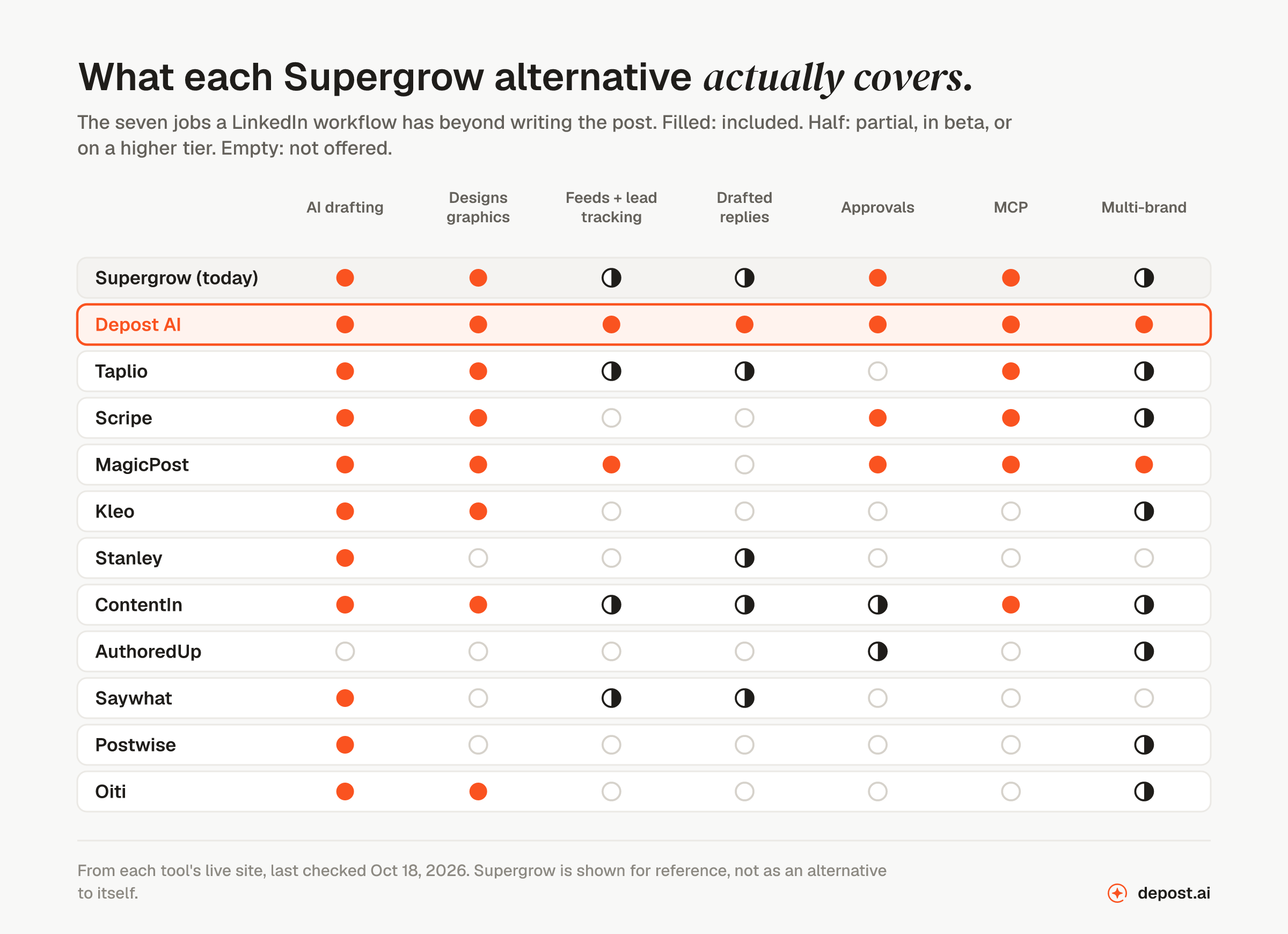
| # | Tool | What it is | What it covers beyond drafting |
|---|---|---|---|
| 1 | Depost AI | Plans the week from your results, and remembers the brand | Graphics, feeds, replies, approvals, MCP, multi-brand |
| 2 | Taplio | Many separate features that you run yourself | Carousels, outreach to leads, MCP |
| 3 | Scripe | Posts from your calls, docs, and colleagues’ voice answers | Graphics, approvals, MCP, company pages |
| 4 | MagicPost | Writing for agencies, with client approval by link | Graphics, lead detection, approvals, MCP, multiple brands |
| 5 | Kleo | Post writing with visuals, from a web app | Graphics, extra profiles |
| 6 | Stanley | An assistant you message, across platforms | Some replies |
| 7 | ContentIn | A voice learned from your profile, posts, and edits | Graphics, MCP, company pages |
| 8 | AuthoredUp | An editor and analytics, with no AI writing | Formatting, previews, post analytics |
| 9 | Saywhat | Drafting plus expert feedback and a community | Feedback on posts, some commenting help |
| 10 | Postwise | A scheduler built for X that also handles LinkedIn | Posting to X and Threads |
| 11 | Oiti | An AI clone built from your profile, website, and audience | Graphics, company pages |
Every entry links to a comparison page that carries current pricing. Prices move often, and they are rarely the reason people make this change.
1. Depost AI
Best for: creators, B2B teams, and agencies whose customers are on LinkedIn, and who want the week planned, written, and designed for them, with approval on every post.
This is ours, so weigh it accordingly. The case against Supergrow is not that it writes worse. It is that Depost AI does the work around the draft as well, starting from what has already worked on your account.
Connect LinkedIn and Depost AI builds the brand memory for you: your positioning, a voice learned from your published posts and refreshed every week, each post with its real numbers, and the posts you save. You do not fill in a profile or sit an interview. You can add documents and notes for it to read, or leave that out. Every agent reads the memory before it writes, and a Sources panel on each draft shows what it used.
What a week looks like
Every tool on this list writes posts. Where they differ is what happens before and after the draft, and who does it.
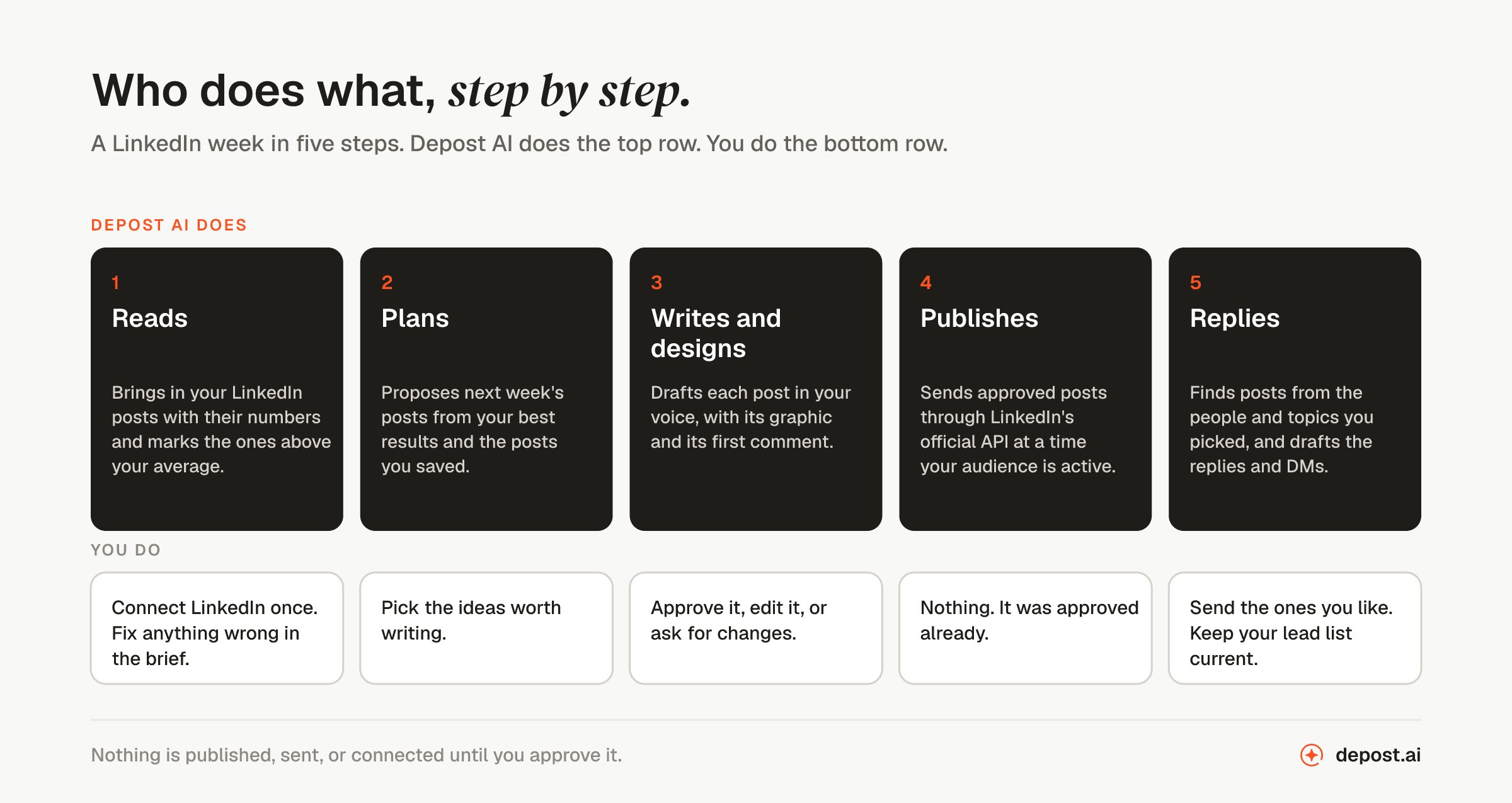
It reads your LinkedIn numbers. Once you connect, your history comes in: impressions, engagement rate, follower growth, and every post you have published. The Analyst picks out the posts that beat your own average and explains why: the hook, the format, the topic, the time. Ask “what worked last month?” in chat and you get the answer with the posts next to it.
It plans from them. The ideas for next week begin with what worked on your account. The inspiration library and your saved posts come second. You pick the ones worth writing, so you are choosing from a list, not starting each post from scratch.
It writes and designs. Each draft is in your voice and comes with an infographic in your colors and fonts and a first comment ready to post. For carousels, it writes the slides and its carousel generator designs them. You can still start from a voice note, a bookmark, a case study, or a call transcript when you have one.
It publishes after you approve. You approve, edit, or ask for changes. Approved posts are scheduled for a time suggested from when your audience actually engages, and they publish through LinkedIn’s official API. If a post fails to publish, you get an email and can retry or reschedule it.
It helps you reply. You name the prospects, niches, and topics, and Depost AI builds feeds around them across LinkedIn, X, Reddit, Threads, and Facebook. It drafts replies, DMs, and connection notes from what each person actually posted. Lead lists come with stages, notes, and reminders. You are the one who presses send.
What that does for the business
- Your plan improves week by week. Each plan begins with the posts that beat your average the week before, so you repeat what your audience responds to.
- Replying takes less time. Drafts of the replies are waiting when you sit down, so you edit and send. You do not start from an empty box.
- Commenters become leads. A person who comments twice goes onto a lead list, with a stage, a note, and a follow-up reminder.
- Your profile gets checked too. After you connect, your profile is scored one section at a time, so visitors who arrive from a post find a complete profile.
- Reviewers cost nothing. On Team you can invite clients, assistants, and reviewers for free, with review rounds, threaded comments, roles per brand, and an audit trail.
- You can use it from Claude and ChatGPT. An MCP server comes with every plan, with its own key per brand. Your AI assistant can read your analytics, put drafts on your calendar, and list what is waiting for review.
Ready for a creator, a B2B team, or an agency
Supergrow is built for individuals and for marketing teams with up to five executives posting. Depost AI is set up for three kinds of customer, with no cap at five.
- Creators. Solo covers one LinkedIn account and has every feature, so one person gets the same planning, graphics, and replies a team gets.
- B2B teams. Each founder, executive, or salesperson connects their own profile and gets their own voice and brand memory. Marketing or legal reviews each post first, with roles and an audit trail.
- Agencies. Every client is a separate brand with its own memory, calendar, and MCP key. Clients are invited free and approve in review rounds, and one Team plan holds up to 30 accounts. For a wider look, see eleven LinkedIn management tools for agencies.
What it costs as you grow
Solo is $59 a month. It covers one LinkedIn account and has every feature. Team is $99 a month for the first account and $59 for each added account, up to 30. People are free on Team, so ten client brands come to $630 a month no matter how many people work on them. Both plans start with a 7-day free trial, and yearly billing gives you two months free. The pricing page has the details.
Supergrow’s Pro plan is $39 a month for one account, and Teams is $199 a month for five. Past five accounts, its Enterprise plan is priced by request.
Moving from Supergrow
- Your history is on LinkedIn. Your posts live on LinkedIn, not in Supergrow. About fifteen minutes after you connect, Depost AI drafts a brief from your profile and your last fifty or more posts, covering your positioning, topics, audience, and voice. Fix what is wrong and approve the rest. Analytics are complete from day one.
- You do not rebuild your Content DNA. Your voice is learned from what you have already published. There is nothing to fill in or teach again.
- Voice notes still work. If you are used to talking through a post, send a voice note in the chat and it becomes a draft with a graphic.
- Your team comes with you. Each person connects their own LinkedIn account and gets their own brand memory. Reviewers are invited free.
- Scheduled posts stay behind. No two tools transfer them. Anything Supergrow has scheduled for you needs to be created again, which takes an afternoon.
Who it is not for
- Anyone who posts to Instagram, X, and LinkedIn from one place. Depost AI publishes to LinkedIn only. Its feeds and saved posts also cover X, Reddit, Threads, and Facebook.
- Anyone who wants posts to go out without reading them. Every post, reply, and message waits for your approval, on purpose.
The full comparison with Supergrow puts the features side by side. The free trial runs seven days on both plans. Read the brief it drafts in the first fifteen minutes, and you will know whether it sounds like you.
2. Taplio
What it is: a set of separate features: writing help, a library of posts, carousels, outreach to leads, analytics, and scheduling. You open each one and run it yourself.
What it covers
- AI carousels with a brand kit, analytics, and scheduling.
- MCP, and an official Claude connector.
What to know
- It does not plan or draft the week for you. You work through it one feature at a time.
- Auto-connect and DMs to warm leads go out under your name, including when you are not watching.
3. Scripe
What it is: a LinkedIn tool for teams and agencies that makes posts from what you already have: customer calls, documents, and colleagues’ answers to a question, given by voice over WhatsApp or email.
What it covers
- Ideas from your calls and documents, through integrations with Granola and Notion.
- Carousels and infographics in your brand kit, for every profile.
- Approvals sent to Slack, the company page and every colleague in one calendar, and an API, webhooks, and MCP.
What to know
- It is built for teams. Extra full seats cost more, and cheaper Light seats cover engagement and analytics only.
- On the Advanced plan, it likes and comments on your posts across your profiles automatically.
- Its site shows no drafted replies or lead lists.
- The free trial needs a credit card.
4. MagicPost
What it is: a writing tool built for agencies and ghostwriters. Each client has a workspace, and clients approve posts from a link.
What it covers
- Client approval by link, with no MagicPost account needed, and white-label reports.
- Visuals, AI photos, carousels, and lead detection.
- MCP and an API.
What to know
- Carousels, visuals, and unlimited post generation are on its higher Creator plan.
- It does not draft replies, so you write your own comments.
5. Kleo
What it is: a paid web app for writing LinkedIn posts, with visuals, scheduling, and analytics. It learns your expertise, writing style, products, and past content.
What it covers
- Post writing, 20 visuals a month, scheduling, and analytics.
- Extra profiles for a team or clients, at an added monthly price each.
What to know
- Its site shows no approvals, feeds, drafted replies, or MCP.
- There is no free trial. Kleo offers a 30-day money-back guarantee instead.
- The free Chrome extension people remember was shut down in June 2025. Kleo today is a separate web app.
6. Stanley
What it is: an assistant you message over iMessage, Telegram, WhatsApp, or the web. It drafts posts for several platforms, schedules them, and replies to comments.
What it covers
- Drafting and scheduling across platforms, from a message thread.
- Replies to comments, in part.
What to know
- It treats LinkedIn as one platform of several.
- Its site shows no approvals, client access, or team plan, and it has no pricing page.
7. ContentIn
What it is: a writing tool that reads your profile and past posts to learn your voice, then fills a knowledge base through an interview. Every Sunday it drafts the next week’s posts from material you give it.
What it covers
- Drafts in a voice learned from your profile, your posts, and your edits.
- Carousels, AI images, AI comments, and scheduling for your profile and company page.
- MCP on the Pro plan.
What to know
- The weekly plan is two posts on Growth and three on Pro, drafted from material you supply.
- Multiple profiles, team seats, and approvals are on a custom Ghostwriter / Agency plan.
8. AuthoredUp
What it is: a formatting editor with analytics on the posts you have published. By design, it does not write posts.
What it covers
- Formatting, phone and desktop previews, and analytics on past posts. Pricing is per profile, and lower per profile from three profiles.
What to know
- There is no AI writing and there are no graphics.
- There are no feeds and no drafted replies, so you will use it next to other tools.
9. Saywhat
What it is: a drafting tool sold together with expert feedback on your posts, community calls, and help with commenting.
What it covers
- Drafting, feedback on your posts from experts several times a week, and monthly live calls.
- Help with commenting, in part.
What to know
- It has no graphics, approvals, MCP, or support for several brands.
- Features are split across plan tiers, so more help moves you up a plan.
10. Postwise
What it is: a scheduler built for X that can also publish to LinkedIn and Threads, with AI that turns your notes into posts.
What it covers
- One schedule across X, LinkedIn, and Threads.
- Basic post drafting.
What to know
- X comes first in the product, so LinkedIn gets less attention.
- It has drafting and scheduling only: no graphics, feeds, replies, or approvals.
11. Oiti
What it is: a writing tool that builds an AI clone of you from your LinkedIn profile, your website, and research on your audience. It keeps a knowledge base and a long-term memory of your corrections.
What it covers
- Drafts from your clone and your knowledge base, with infographics.
- Scheduling and analytics for personal profiles and company pages, through LinkedIn’s official APIs.
What to know
- Its site shows no approvals, feeds, drafted replies, or MCP.
- One clone on its Creator plan. Pro allows up to three clones and three personal accounts.
When the switch is worth it
When you want next week planned from your own LinkedIn results, not started from a new interview each time. When you want each post to arrive with its graphic. When the people who comment on your posts should turn into a lead list with reminders. When a sixth account arrives, or a client or reviewer needs to approve without paying for a seat.
The one real cost is the scheduled posts, covered under moving from Supergrow above. Everything else comes with you, because it lives on LinkedIn and not in the tool.
What the other lists get wrong
Three things to keep in mind when you read the other results for this search.
Pricing sites quote old Supergrow plans. Software listing sites still show a $19 Starter plan and a $139 Teams plan. Supergrow’s own pricing page showed no $19 plan when we read it in October 2026: Pro was $39 a month and Teams was $199 for five accounts. Check the vendor’s own page before you compare.
They compare the drafts. Most lists put sample posts side by side. AI drafts from these tools read much alike, and yours will be edited anyway. What separates them is the work around the draft: who comes up with the idea, whether the graphic comes with it, who approves it, and what happens to the replies.
Vendor lists rank the vendor first. Almost every page that ranks for this search was written by a company selling a Supergrow alternative, and each one puts itself at number one. This one does too, and says so in the first line. The ranking is not the useful part. Look for a page that shows what each tool covers, so you can check its claims against a table.
FAQ
What is the best Supergrow alternative?
Depost AI. It plans the week from your own LinkedIn results instead of waiting for you to start, designs a graphic with each draft, drafts replies to the people you want to reach, and keeps one brand memory per account. One Team plan holds up to 30 accounts, with reviewers invited free. Nothing publishes until you approve it.
How much does Supergrow cost?
Supergrow’s Pro plan is $39 a month billed monthly for one account, and Teams is $199 a month for five accounts. Enterprise, for more than five, is priced by request. Every plan has a 7-day free trial. We read these on its pricing page on 18 October 2026. Depost AI is $59 a month for one LinkedIn account, or $99 a month for a team’s first account and $59 for each one after, both with a 7-day free trial.
Is there a free Supergrow alternative?
Not a full one. Every tool in this category charges for the app, because AI drafting costs money to run. What is free is the single jobs: our free LinkedIn tools cover post ideas, hooks, a carousel generator, formatting, and post previews, with no account. The best free LinkedIn tools compares them with Supergrow’s own free tools.
Supergrow vs Taplio: which is better?
They are built differently. Supergrow starts each post from an interview, a voice note, or a topic, and its Teams plan adds approvals for up to five accounts. Taplio is a set of separate features, including carousels, analytics, and auto-connect and DMs to leads. Both start at $39 a month. Neither plans your week from your own LinkedIn results, which is what decides this list.
Supergrow vs MagicPost: which is better for agencies?
MagicPost is built for agencies: each client has a workspace, approves from a link without an account, and gets white-label reports. Supergrow’s Teams plan includes five accounts, with more on its Enterprise plan. Depost AI holds up to 30 client accounts on one Team plan, with clients invited free.
Supergrow vs AuthoredUp: what is the difference?
Supergrow writes posts with AI. AuthoredUp does not: it is a formatting editor with previews and analytics on your published posts. AuthoredUp is built for people who write every word themselves. Supergrow and Depost AI write with you.
What is the difference between Content DNA and brand memory?
Content DNA is Supergrow’s profile of a person: their role, audience, topics, opinions, and writing patterns, applied to each draft. Depost AI’s brand memory holds your positioning and voice too, plus every post you have published with its real numbers, the posts you saved, and your own documents. That is what lets it plan next week from what already worked.
Which Supergrow alternative is safest for my account?
Ask any tool two things: what it sends without you, and how it publishes. A tool that publishes through LinkedIn’s official API and waits for a person to approve each post, reply, and message is a lower risk than one that connects, comments, or messages on its own. What gets a LinkedIn account restricted explains where the line is, and how many comments a day is safe covers volume.