11 Best LinkedIn Management Tools for Agencies in 2026
Eleven LinkedIn management tools for agencies that run LinkedIn for clients, compared on how they keep clients apart, how a client approves a post, and what each new client adds to the bill.

· 16 min read
On this page
- Four questions that sort the list fast
- How to manage multiple LinkedIn accounts for clients
- The eleven at a glance
- 1. Depost AI
- 2. Taplio
- 3. Scripe
- 4. Supergrow
- 5. MagicPost
- 6. AuthoredUp
- 7. ContentIn
- 8. Sendible
- 9. Agorapulse
- 10. Buffer
- 11. Hootsuite
- What ten clients cost
- What about outreach automation tools?
- Tools left off this list
- Free tools that help with client work
- FAQ
Running LinkedIn for one person is a writing job. Running it for ten clients is an operations job. You need each client’s posts to sound like that client, you need the client to approve them without a long email thread, and you need a bill that still makes sense when the tenth client signs.
A LinkedIn management tool is software for planning, writing, approving, publishing, and reporting on LinkedIn posts from one place. Most were built for one person and one profile. This list covers eleven that an agency can run clients on, and compares them on the things that only matter once you have clients. It starts with ours.
It is about content. Tools that send connection requests and messages automatically are a different kind of tool, and there is a short section on them near the end.
Four questions that sort the list fast
Are clients kept apart? With one client, everything lives in one account. With ten, you need each client’s drafts, voice, and reviewers in a separate space, so nothing from one client shows up in another’s. Tools call this a workspace.
How do you get into the client’s LinkedIn? LinkedIn’s User Agreement says members will keep their password secret and will not share their account with anyone else. So the client should connect their own account to the tool through LinkedIn’s sign-in, and you work inside the tool. If a tool needs the client’s password, that is a reason to stop.
How does the client approve a post? Someone at the client has to say yes before a post goes out under their name. Check whether the tool has an approval step, whether the client needs a paid seat to use it, and whether the approval is recorded.
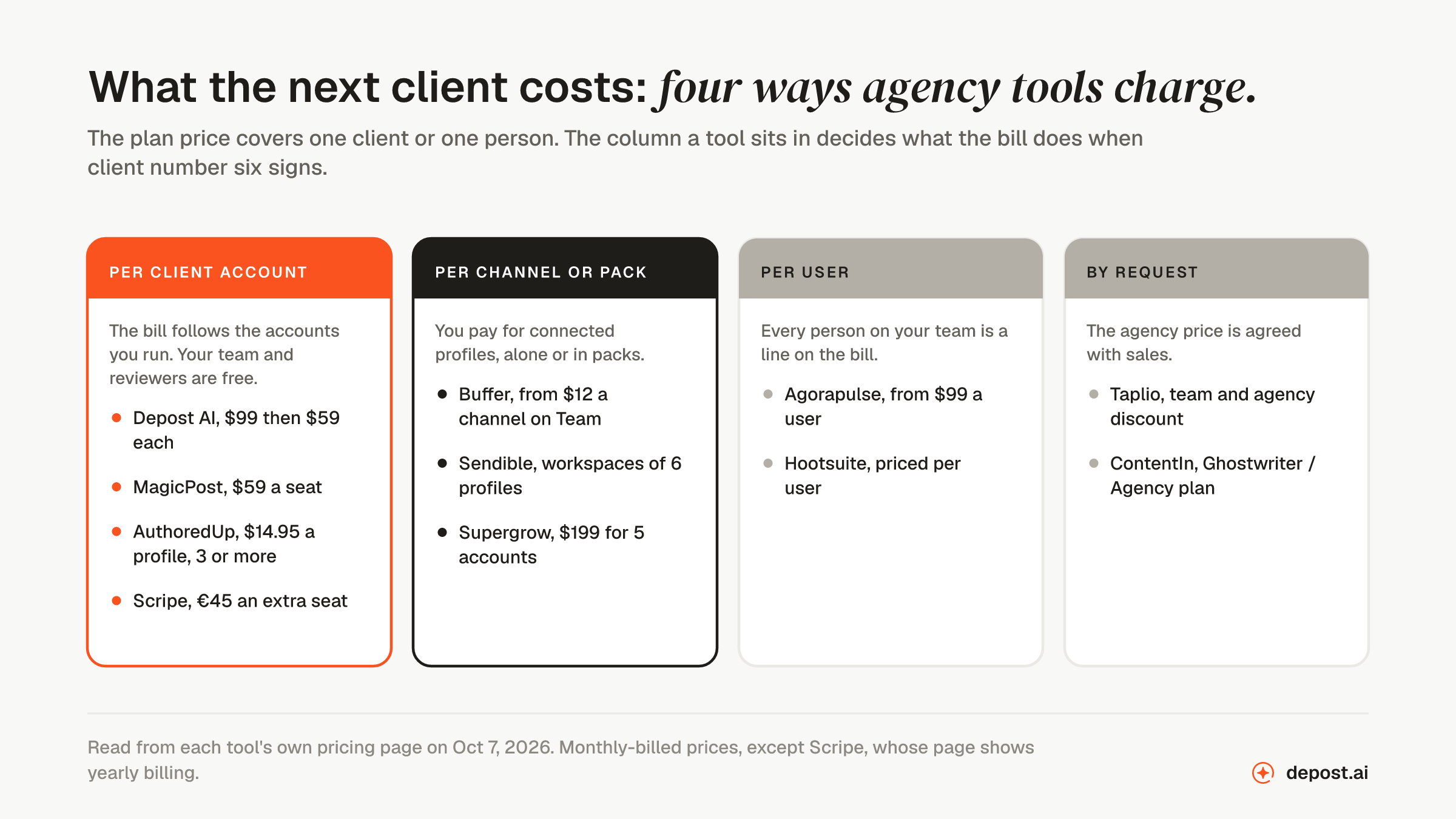
What does the next client cost? The price on the pricing page covers one client or one person. What matters to an agency is what the bill does at five clients and at ten.
How to manage multiple LinkedIn accounts for clients
LinkedIn allows one account per person. Its User Agreement says you will only have one LinkedIn account, in your real name. So an agency never has “multiple accounts” of its own. It has access to each client’s account, and the safe way to set that up is the same in every tool on this list:
- Create a workspace for the client. Their drafts, their brand, and their reviewers go here and nowhere else.
- Ask the client to connect their own LinkedIn account. They sign in through LinkedIn’s own sign-in screen and approve the tool. You never see the password, and they can remove the access at any time.
- Set who does what. Decide who on your team drafts, who edits, and who at the client approves.
- Send posts for approval before they are scheduled. A post goes out only after the client has said yes.
- Report on each client separately. Use that client’s own numbers, not an average across your clients.
What you should not do is keep client passwords in a shared spreadsheet and log in as each client from your own browser. It breaks LinkedIn’s terms, and one leaked spreadsheet exposes every client at once.
The eleven at a glance
| # | Tool | What it is | Client approval | How it charges |
|---|---|---|---|---|
| 1 | Depost AI | Plans, writes, and designs each client’s posts | Yes, reviewers invited free | $99, then $59 per account |
| 2 | Taplio | LinkedIn tool with client workspaces | Yes | Team and agency price by request |
| 3 | Scripe | LinkedIn content tool with client workspaces | Yes, in the client’s workspace | Per seat, agency price by request |
| 4 | Supergrow | LinkedIn writing tool with a team plan | Yes, on Teams | $199 for 5 accounts |
| 5 | MagicPost | LinkedIn writing tool with an agency plan | Yes, by the client | $59 per client seat |
| 6 | AuthoredUp | LinkedIn editor for people who write the posts | Read-only draft link | $14.95 per profile, 3 or more |
| 7 | ContentIn | LinkedIn writing tool with an agency plan | Yes, on the agency plan | By request |
| 8 | Sendible | General scheduler built for agencies | Yes, from the Plus plan | Workspaces of 6 profiles |
| 9 | Agorapulse | Social media suite with shared calendars | Yes, one step | From $99 per user |
| 10 | Buffer | General scheduler priced per channel | Yes, on Team | From $12 per channel on Team |
| 11 | Hootsuite | Social media suite for larger teams | On Advanced | Per user |
Every fact about the other ten tools is from the tool’s own website, read on 7 October 2026. Prices are the monthly-billed price unless the entry says otherwise. Where a site does not state something, this list says so and does not guess.
1. Depost AI
Best for: agencies and ghostwriters who run LinkedIn personal profiles for clients, and want the posts planned, written, and designed for each client, with the client approving every one.
This is ours, so weigh it accordingly. Most tools on this list help your team write faster. Depost AI does the first draft of the whole week for each client, and your team edits and approves.
A workspace for each client
Each client gets their own workspace: their LinkedIn account, their posts, their reviewers, and their knowledge base. Clients do not see each other. Your team sees the workspaces you add them to.
The client connects their own LinkedIn account, so nobody shares a password. When a client leaves, you remove the workspace and that account comes off the next bill.
Each client’s own voice
Depost AI reads the client’s profile and the posts they have already published, and builds a brand memory for that client: their positioning, their voice, and every post with its numbers. It reads that memory before it writes anything. Client five does not sound like client two, because each one is learned separately.
Four agents work for each client:
- Performance Analyzer reads the client’s own analytics and finds the posts that beat their average.
- Idea Generator suggests next week’s ideas from those posts.
- Post Generator writes the drafts in the client’s voice.
- Graphic Generator designs an infographic for each draft in the client’s colors and fonts.
Approval the client can do
Nothing publishes until someone approves it. On the Team plan you get comments, review rounds, roles, and an audit trail, so there is a record of who approved what. The client reviews in their own workspace.
Clients, teammates, and freelancers are invited free. Asking a client to approve their own posts does not add a seat to the bill.
Approved posts publish through LinkedIn’s official API, at the times you set for that client.
What it costs as you add clients
Team is $99 a month for the first LinkedIn account and $59 a month for each one after that, up to 30. Workspaces are unlimited. Three clients cost $217 a month, and ten cost $630. Above 30 accounts, the Enterprise plan is priced with you. There is a 7-day free trial, and the details are on the pricing page.
Who it is not for
- Agencies that post to company pages. Depost AI publishes to personal profiles.
- Agencies that schedule the same post to several networks. Depost AI publishes to LinkedIn only.
The agencies page shows the setup.
2. Taplio
What it is: a LinkedIn tool with writing help, a library of popular posts, and a page for agencies.
What it covers
- A separate workspace for each client, with permissions per client.
- Client approval: its agencies page says clients can keep an approval step on everything you schedule.
- Each client connects their own LinkedIn account, so no passwords are shared.
- Analytics for each client that you can export.
What to know
- Public plans are $39, $69, and $199 a month. The team and agency price is not on the page. It offers a discount of “up to 30%” on request.
- White-label reports are not offered as such. Its site says agencies export the numbers or pull them through its API into their own reports.
- It also offers automatic connection requests and messages. See the section on outreach automation below before you turn those on for a client.
3. Scripe
What it is: a LinkedIn content tool for teams, with a page for agencies.
What it covers
- Every client in their own workspace, with their own knowledge base and brand kit.
- An approval flow you set once and adjust for each client. The client approves in their own workspace or sends a draft back with a note.
- Each person connects their own LinkedIn profile through LinkedIn’s sign-in.
- Company pages, from the Advanced plan.
- A CSV export of each client’s numbers.
What to know
- Its pricing page shows yearly billing: €55, €79, and €119 a month. Extra full seats are €45 a month each from the Advanced plan, and multiple workspaces need the Business plan.
- Agency pricing with volume discounts is by request.
- To review and approve, a client user joins their workspace with a Client role.
4. Supergrow
What it is: a LinkedIn writing tool with a plan for teams.
What it covers
- Feedback and approval workflows on the Teams plan.
- A voice profile for each team member.
- One content calendar across all members, and analytics for the whole team.
- An organization dashboard, which its site says is free for the admin.
What to know
- Teams is $199 a month and includes 5 accounts. For more than 5, you contact them.
- The plan is described for a company’s own executives and team members. Its pricing page does not mention client management.
- It can post a first comment automatically after a post goes out.
5. MagicPost
What it is: a LinkedIn writing tool with a plan made for agencies and ghostwriters.
What it covers
- An Agency plan where one seat is one client’s LinkedIn account, either a personal profile or a company page.
- Post approval by the client, and a client calendar you can share for approval.
- White-label reports.
- Admin-only seats for your own team at no charge.
What to know
- The Agency plan is $59 a month per seat, so ten clients cost $590 a month.
- Post generation, visuals, and scheduling are included for every seat.
- You run the writing workflow yourself for each client, one step at a time.
6. AuthoredUp
What it is: a LinkedIn editor for people who write the posts themselves.
What it covers
- An editor with text styling, a preview, and saved drafts and snippets.
- Company pages on every plan at no extra cost.
- An organization with Admin, Manager, and Member roles on the Business plan.
- Billing per connected LinkedIn profile. Its site says managers and ghostwriters who do not connect their own profile are free.
What to know
- Business is $14.95 a month per profile, with a minimum of 3 profiles. Ten clients cost $149.50 a month.
- There is no approval workflow. You can share a read-only link to a draft for review.
- It works through a browser extension, and you write every post. Its AI writing feature is in closed beta.
7. ContentIn
What it is: a LinkedIn writing tool for founders, with a plan for ghostwriters and agencies.
What it covers
- A Ghostwriter / Agency plan with multiple LinkedIn profiles and team seats.
- Approval and review flows on that plan.
- Company pages on the Pro plan.
What to know
- The Ghostwriter / Agency plan has no public price. You talk to them.
- The public plans, $39 and $48 a month, cover one personal profile.
- Its pricing page does not say how clients are kept apart.
8. Sendible
What it is: a general social media scheduler built for agencies.
What it covers
- A workspace for each client or brand, each with 6 social profiles.
- Unlimited users on every plan, including clients and freelancers.
- Client Connect, which lets a client connect their profiles without giving you a password.
- Assignment and approval workflows from the Plus plan.
- Reports for each network.
What to know
- Plans go up by the number of workspaces: 1 on Core, 3 on Plus, and 7 on Premium.
- White labeling, with your own branding on the dashboard and reports, is a paid add-on.
- It publishes to LinkedIn and other networks. Your team writes the posts.
9. Agorapulse
What it is: a social media suite with an inbox, reports, and shared calendars.
What it covers
- Shared calendars that let people outside your team review posts before they publish. The Advanced plan includes 5.
- One-step approval workflows, where a post is sent to a teammate or a client. Approval chains with several reviewers are on the Custom plan.
- Reports you can export with your branding.
- LinkedIn company pages and personal profiles, plus other networks.
What to know
- Pricing is per user: $99, $149, and $199 a month.
- Every person on your team who needs access adds to the bill.
- Your team writes the posts.
10. Buffer
What it is: a general social media scheduler priced per channel.
What it covers
- LinkedIn profiles and company pages, plus other networks.
- Unlimited team members on the Team plan.
- Content approval workflows and access levels on the Team plan, so you choose who can draft, who can approve, and which channels each person sees.
What to know
- Team is from $12 a month per channel, and its site says the price per channel goes down as you add more. Ten client profiles cost up to $120 a month.
- Its pricing page does not mention a workspace per client. You control access channel by channel.
- Your team writes the posts.
11. Hootsuite
What it is: a social media suite for larger teams.
What it covers
- LinkedIn and other networks from one dashboard.
- Review and approval of content with your team on the Advanced plan.
- Message assignment and team performance reports.
What to know
- Pricing is per user. Its site says paid plans start at $99, and its pricing page shows prices on annual billing.
- Its plans page lists review and approval under the Advanced plan.
- Your team writes the posts.
What ten clients cost
Four of the eleven publish a price you can multiply. For ten client profiles:
- Buffer, Team: 10 channels at up to $12, so up to $120 a month. You get scheduling and approvals. Your team writes everything.
- AuthoredUp, Business: 10 profiles at $14.95, so $149.50 a month. You get an editor and analytics. Your team writes everything.
- MagicPost, Agency: 10 seats at $59, so $590 a month. You get writing help, client approval, and white-label reports.
- Depost AI, Team: $99 plus 9 at $59, so $630 a month. The posts and graphics are drafted for each client, and reviewers are free.
Depost AI is not the cheapest of the four. The difference is who does the writing. With the first two, you pay for a place to publish from, and your team still writes every post. If writing for ten clients takes one person most of their week, that time costs more than any of these plans.
For the per-user tools, the bill depends on your team, not your clients. Three people on Agorapulse’s Professional plan is $447 a month.
What about outreach automation tools?
If you search for LinkedIn tools for agencies, most lists you find are about a different kind of tool: software that sends connection requests and messages for a client automatically.
Read LinkedIn’s rules before you use one on a client’s account. Its User Agreement says members agree not to use bots or other unauthorized automated methods to add contacts, send messages, or comment on, like, or share posts. LinkedIn Help also has a page on prohibited software and extensions. Our glossary explains what counts as LinkedIn automation.
The account at risk is your client’s, not yours. What gets a LinkedIn account restricted explains what LinkedIn acts on. None of the eleven tools above is on this list for automated outreach.
Tools left off this list
Kleo and Stanley are popular with solo creators. Neither site shows a team plan, client workspaces, or an approval step, so they are not here. They are covered in Kleo alternatives and Stanley alternatives.
If scheduling is the only job, twelve LinkedIn scheduling tools compares more general schedulers. For a side-by-side look at Depost AI and any LinkedIn tool above, see the comparison pages.
Free tools that help with client work
Two jobs before a client’s carousel goes up do not need a paid tool. The carousel tester shows the PDF inside a post at phone width, so you can check it before you send it for approval. The PDF metadata remover takes your name and your working file name out of the file. Both are free and need no account.
FAQ
What is the best LinkedIn management tool for agencies?
Depost AI, for agencies that run personal profiles. Each client has a separate workspace, the posts are drafted in that client’s voice with a graphic, and the client approves them free of charge. It costs $99 a month for the first account and $59 for each one after. For company pages or several networks, Sendible or Buffer fits better.
What is a LinkedIn management tool?
Software for planning, writing, approving, publishing, and reporting on LinkedIn posts from one place. General ones, such as Buffer and Hootsuite, cover several networks and schedule posts your team writes. LinkedIn-only ones, such as Depost AI and MagicPost, also help write the posts.
Can you manage multiple LinkedIn accounts?
Yes, if each account belongs to a different person and that person connects it to your tool. LinkedIn allows one account per person, so you cannot hold several of your own. An agency manages each client’s account from a separate workspace, after the client connects it through LinkedIn’s sign-in.
How do agencies manage multiple LinkedIn accounts?
With a tool where each client connects their own LinkedIn account through LinkedIn’s sign-in, and the agency works inside a separate workspace for that client. This avoids shared passwords, which LinkedIn’s User Agreement does not allow, and it keeps one client’s drafts away from another’s.
Can an agency log in to a client’s LinkedIn account?
LinkedIn’s User Agreement says members will keep their password secret and will not share their account with anyone else. Use a tool the client connects their account to instead. The client stays in control and can disconnect the tool at any time.
How do clients approve LinkedIn posts?
In most tools on this list, the client reviews a draft and approves it or sends it back with a comment, and the post only publishes after that. Check whether the client needs a paid seat. In Depost AI, reviewers are invited free, and each approval is recorded in an audit trail.
How much do LinkedIn tools for agencies cost?
For ten client profiles, the published prices run from about $120 a month on Buffer’s Team plan to $630 a month on Depost AI’s Team plan. The cheaper tools schedule posts your team writes. Agorapulse and Hootsuite charge per user, and Taplio, Scripe, and ContentIn price their agency plans on request.
Is there a white-label LinkedIn tool for agencies?
MagicPost lists white-label reports on its Agency plan, and Sendible sells white labeling as a paid add-on. Taplio says agencies export its numbers into their own reports.
Do these tools work with company pages?
Some do. MagicPost, Scripe, AuthoredUp, ContentIn, Agorapulse, and Buffer list company pages on their sites. Depost AI publishes to personal profiles only.