Does LinkedIn Penalize AI-Generated Content? What It Has Said in 2026
In 2026 LinkedIn said it limits the reach of AI-looking posts, gave readers a button to flag them, and removed its own AI writing tool. Here is what it said, in its own words with dates, and what to do if you use AI to write.

· 12 min read
On this page
Three things happened on LinkedIn in 2026 that no other platform had done. In May it said it limits the reach of AI-written posts that carry no point of view. In July it gave readers a button to flag them. In August it removed its own AI writing tool.
Most of what you have read about “the LinkedIn AI penalty” is a guess built on those three facts, usually with a percentage attached that nobody can trace. This post is the record instead: what LinkedIn said, in its own words and with dates, what actually happens to a flagged post, and what to do if you use AI to write.
What LinkedIn has said, dated
Every item below is LinkedIn describing its own behavior, either in its newsroom or through a named executive quoted by a named publication. Nothing is inferred from a reach chart.
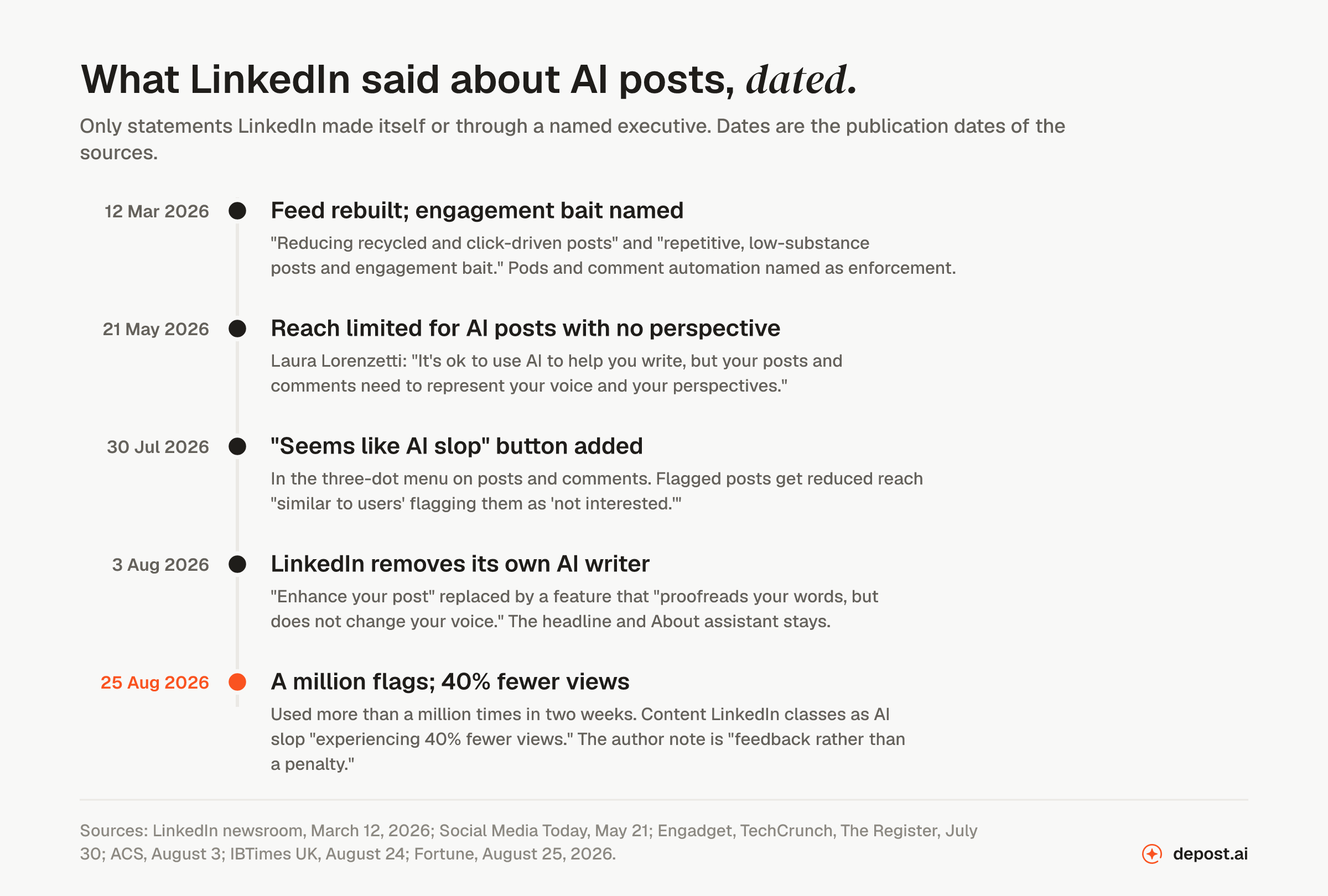
12 March 2026. LinkedIn announced its rebuilt feed and, in the same post, what it is pushing down: “We’re reducing recycled and click-driven posts to make the Feed feel more useful” and “repetitive, low-substance posts and engagement bait, such as ‘comment to agree’ prompts or videos that don’t match the text.” It named enforcement separately: “We’re working to make engagement pods ineffective and curb comment automation or third party tools that create fake conversations.” It also said this: “This isn’t about limiting reach or discouraging participation. It’s about making sure that when you engage with a post, you’re interacting with a real person and a real point of view.” How the LinkedIn algorithm works in 2026 covers the ranking side of that announcement.
21 May 2026. Laura Lorenzetti, LinkedIn’s Global Editorial VP, said in an in-app post, as reported by Social Media Today: “When AI is overused, especially at scale and in an automated way, it dilutes the valuable insights that real human conversations can spark.” And the line that settles most of the argument: “It’s ok to use AI to help you write, but your posts and comments need to represent your voice and your perspectives.” The measures described were limits on the reach of AI-generated content that lacks a clear perspective, and detection of automated or AI-generated comments.
30 July 2026. LinkedIn added a “Seems like AI slop” option to the three-dot menu on posts and comments. Engadget reported that flagged posts “will also see reduced algorithmic reach similar to users’ flagging them as ‘not interested.’” Hari Srinivasan, LinkedIn’s Chief Product Officer, told TechCrunch: “AI slop is a top priority for all of us. We really care about this.” The Register quoted him on the scale of the automation problem: “Everyday we are now catching hundreds of thousands of automated comment attempts, and have blocked billions of other automation attempts (posting at scale, slop) in the last couple months alone.”
3 August 2026. LinkedIn removed its own AI writer. Srinivasan, per ACS Information Age, described “removing the ‘enhance your post’ feature you see when you write a post or message and replacing it with a feature that proofreads your words, but does not change your voice.” The AI assistant for profile headlines and About sections stayed.
24 and 25 August 2026. IBTimes UK reported that the button “was used more than one million times in its first two weeks” and that Srinivasan “framed the alert as feedback rather than a penalty.” Fortune reported his figure for the effect: “members are experiencing 40% fewer views on what the platform classified as AI slop compared to a few weeks prior.” That 40% is LinkedIn’s own number, with no method published beside it, so treat it as a direction rather than a measurement you could reproduce.
What “AI slop” means to LinkedIn
It is not an AI detector in the sense most people imagine. Srinivasan was explicit about that to The Register: “AI and slop are not the same thing. Many people refine thoughts with AI, and we believe they want to know when they sound inauthentic.”
The thing being limited is content that “appears to be generated by AI and lacks clear perspective”, in Social Media Today’s summary of the May measures. Both halves matter. A post that reads as generated and says nothing only its author could say is the target. A post that was drafted with help and carries a real number, a real decision and a real opinion is, by LinkedIn’s own words, fine.
LinkedIn also says the definition moves. Srinivasan to ACS: “Slop is hard to define and the definition changes; this lets us tune our models and make better feeds.” The button exists to collect reader judgments and train on them. That is why the reader, not a classifier, is the thing to write for. The glossary entry on AI slop lists the tells readers react to.
What happens to a flagged post
Putting the reports together, the sequence is this.
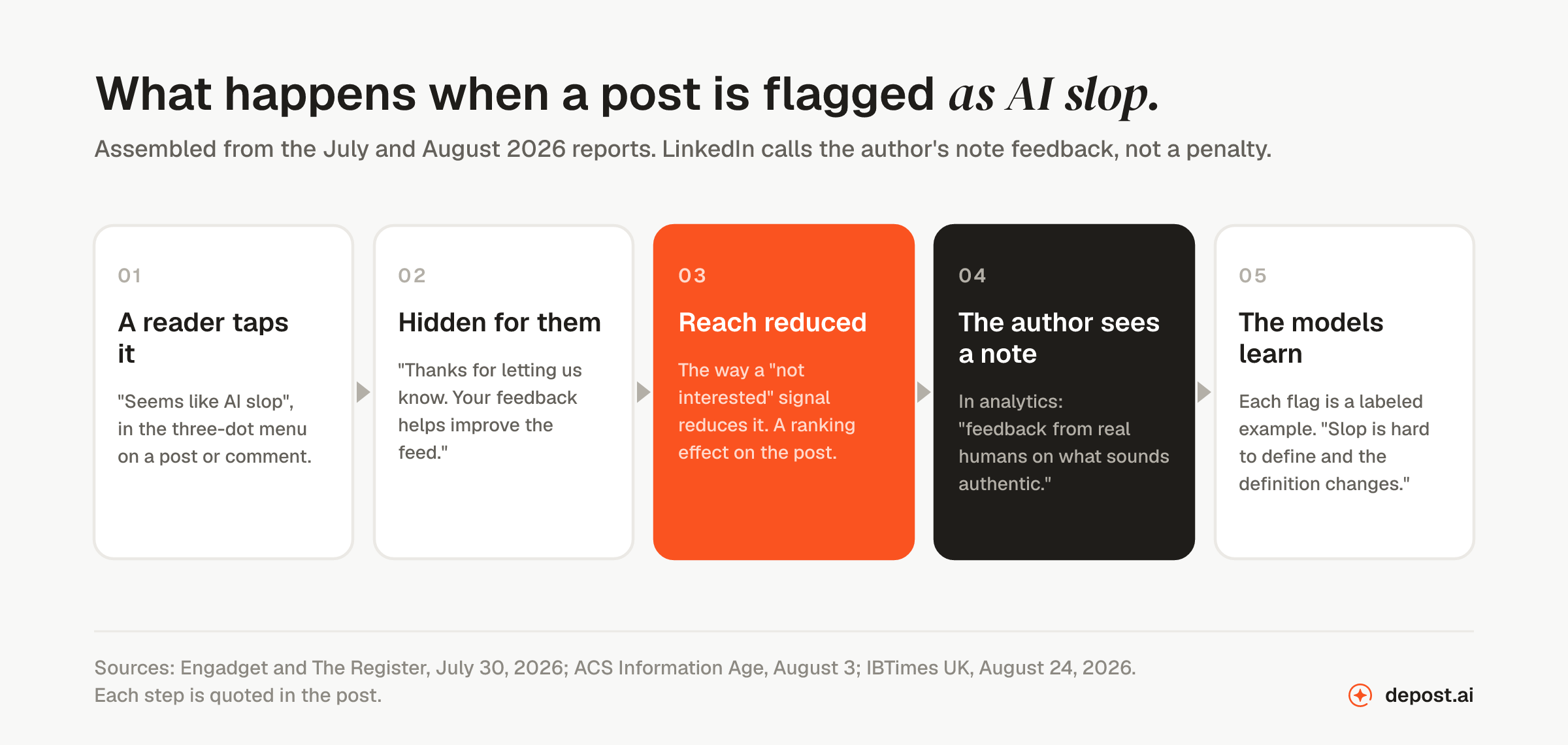
- A reader taps “Seems like AI slop” in the three-dot menu on a post or a comment.
- The post is hidden from that reader’s feed, with the message “Thanks for letting us know. Your feedback helps improve the feed.”
- The post’s reach is reduced in the way a “not interested” signal reduces it. That is a ranking effect on the post, not an action against the account.
- The author sees a note in analytics. LinkedIn is adding analytics showing when readers flag a post as possibly AI-generated, so authors “get feedback from real humans on what sounds authentic,” in The Register’s report of Srinivasan’s words.
- The flag trains the models. Each report is a labeled example of what readers consider slop, which is how LinkedIn tunes detection as the definition shifts.
What LinkedIn has not said is as useful as what it has. It has not published how detection works, how accurate it is, or how many flags it takes before reach moves. It has not described any account-level penalty for AI-written posts. The enforcement language, the thing that can affect an account, is reserved for automation: pods, comment bots and unauthorized third-party tools, which LinkedIn says it blocks by the hundreds of thousands a day.
So, does LinkedIn penalize AI content?
It limits the reach of posts that read as AI and carry no perspective, and it says plainly that using AI to help you write in your own voice is acceptable. LinkedIn itself rejects the word penalty: the author’s note is “feedback rather than a penalty,” and the March announcement said the feed changes were not “about limiting reach or discouraging participation.”
The honest reading is that LinkedIn penalizes generic, not AI. A post written entirely by hand with no number, no decision and no opinion in it reads as slop to the same reader, and the same button is waiting for it. A post drafted with help that carries something only its author could know does not look like slop, because it is not.
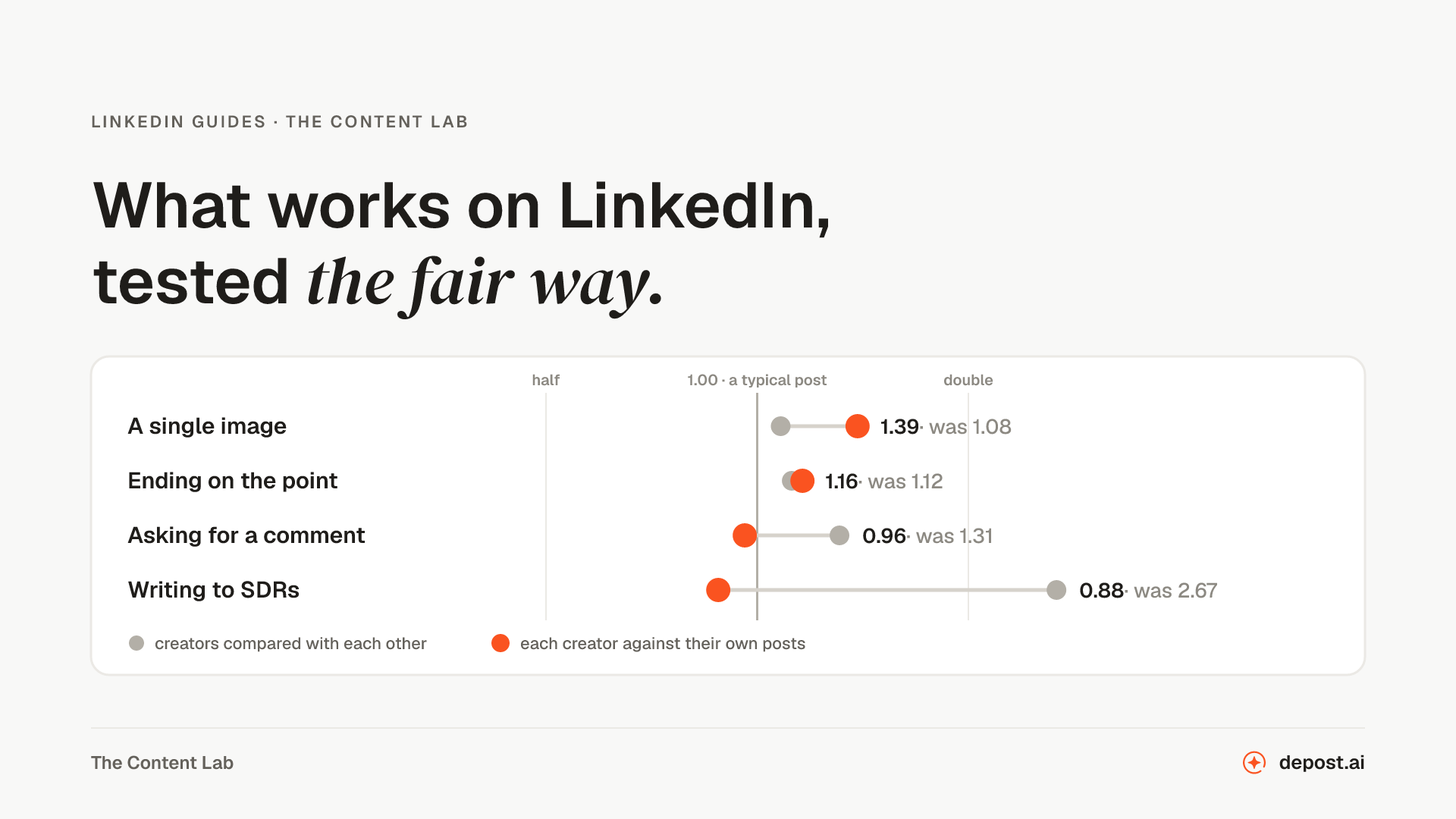
That matches what the data says about posts in general. In a test of 12,791 LinkedIn posts against each writer’s own average, the personal story was the only kind of post that beat the writer’s typical result, and a plain claim a reader could disagree with was the only opening line above average. The things LinkedIn says it wants in the feed are the things that were already working.
How much of the feed is AI-written
Nobody outside LinkedIn knows, and LinkedIn has not said. The estimates in circulation come from companies that sell detection and they disagree with each other. Pangram’s figures, reported by ACS, put nearly a third of short-form LinkedIn content and more than 40% of long-form content as AI-generated. Originality.ai told The Register that 81% of the 5,000 posts it sampled in one month were. Neither method is published in enough detail to check.
The number that is on the record is the one readers supplied: more than a million flags in the button’s first two weeks. Whatever the true share, readers think it is high enough to be worth a tap.
What the removal of LinkedIn’s own writer tells you
This is the most telling move of the year, and it gets the least attention.
LinkedIn built “enhance your post”, put it in the composer, promoted it, and then took it out, replacing it with something that corrects your words without changing them. It kept the assistant for profile headlines and About sections, which are not the feed. A platform that sells AI tools decided that generated posts were costing its feed more than the feature was worth.
The lesson is not that AI is bad at writing. It is that generation was never the valuable part. The value in a post is the material: what happened, what it cost, what you decided, what you think. A model given none of that produces the average of everything already written on the subject, and readers recognize the average on sight because they have read it many times. A model given your material can tighten it. LinkedIn’s own product decision says the same thing: proofread, do not generate.
What to do if you use AI to write
Five moves, in order of how much they matter.
Start from your material, not from a blank prompt. Before anything is drafted, write down the number, the decision, the thing that went wrong, or the opinion someone could argue with. If there is none, the post is not ready, with or without AI.
Use the model the way LinkedIn now uses it on itself. Tighten, cut, fix the grammar, find the weak line. Do not ask it for the point. The point is the part only you can supply.
Read the draft for the tells before you post. Openings that set a scene without making a claim, lists of three where two would do, “it is not X, it is Y”, a tidy lesson at the end, a question as the last line. The AI content detector for LinkedIn checks a draft for the patterns and names the line that gave it away. Copying from a chat window also brings formatting along, as our copy-button test found: Markdown bold, em dashes and curly quotes that mark a post before anyone reads a word of it.
Never automate comments. Reach limits are a ranking matter. Comment automation, pods and unauthorized tools are enforcement, and LinkedIn names them as such. How many comments per day is safe covers where the line sits for commenting by hand.
Watch your analytics. If the note appears, it is not an algorithm’s verdict. It is a reader saying your post sounded like everyone’s. Treat it as the most useful piece of feedback the platform has ever offered, because that is what LinkedIn says it is.
This is the problem Depost AI was built around. It drafts from your own published posts, your numbers and your brand voice rather than from a blank prompt, so the material in the draft is yours before any model touches it, and nothing publishes until you approve it. No tool can promise a post will never be flagged, because a reader decides that. What a tool can do is make sure there is something of yours in the post to begin with.
What is still unknown
Whether the button has reached every member. The July reports described it as being added; by late August LinkedIn was quoting usage figures, which suggests a wide rollout, but LinkedIn has not said it is everywhere.
How detection works, and how often it is wrong. A person who writes in a plain, tidy style has no published way to know whether their posts are being read as generated, other than the analytics note.
Whether the 40% figure holds. It is LinkedIn’s own, from a few weeks of data, with no method beside it.
And whether LinkedIn has acted against any specific AI comment tool by name. We found no such case on the record as of October 2026.
FAQ
Does LinkedIn penalize AI-generated content?
LinkedIn limits the reach of posts that appear AI-generated and lack a clear perspective, and reduces the reach of posts readers flag as AI slop. It does not ban AI-assisted writing. Its own words, from May 2026, are that it is fine to use AI to help you write as long as the post represents your voice and your perspective. LinkedIn describes the author’s flag notice as feedback rather than a penalty.
What is the “Seems like AI slop” button on LinkedIn?
An option LinkedIn added on 30 July 2026 to the three-dot menu on posts and comments. Tapping it hides the post from the reader who flagged it, reduces the post’s reach in the way a “not interested” signal does, and gives LinkedIn a labeled example to tune its detection models. LinkedIn reported it was used more than a million times in its first two weeks.
What happens when a LinkedIn post is flagged as AI slop?
The post is hidden from that reader’s feed with the message “Thanks for letting us know. Your feedback helps improve the feed.” Its reach is reduced in the way a “not interested” flag reduces reach. The author is told privately through analytics that readers flagged it. LinkedIn has described no account-level consequence for flagged posts.
Can you still use AI to write LinkedIn posts?
Yes, by LinkedIn’s own account. Its Global Editorial VP said in May 2026: “It’s ok to use AI to help you write, but your posts and comments need to represent your voice and your perspectives.” What LinkedIn limits is content that reads as generated and carries no point of view.
Did LinkedIn remove its AI writing feature?
Yes. In August 2026 LinkedIn removed the “enhance your post” option from the composer and replaced it with a proofreader that, in its Chief Product Officer’s words, “proofreads your words, but does not change your voice.” The AI assistant for profile headlines and About sections was kept.
How do I know if my LinkedIn posts are being flagged as AI?
LinkedIn is adding a note in post analytics when readers flag a post as possibly AI-generated. It says the purpose is to give authors feedback from real readers on what sounds authentic. LinkedIn has described no public count of flags on a post and no notice to other readers.
Does LinkedIn detect ChatGPT-written posts?
LinkedIn has not published how its detection works or how accurate it is, and its Chief Product Officer has said that “AI and slop are not the same thing.” The signal it is building from is reader flags, which respond to how a post reads rather than to which tool wrote it. A post with nothing specific in it reads as generated whether or not it was.
Are AI-generated comments allowed on LinkedIn?
LinkedIn said in May 2026 that it detects and limits the reach of automated and AI-generated comments, and it names comment automation as something it takes enforcement action against. It reports blocking hundreds of thousands of automated comment attempts a day. Writing a comment with AI help in your own voice is covered by the same rule as posts; running a tool that comments for you is not.