# 15 Best LinkedIn AI Tools in 2026, Ranked and Priced
Canonical page: https://depost.ai/blog/best-linkedin-ai-tools
Fifteen LinkedIn AI tools ranked, with what each one covers beyond writing the post, what it sends from your account without you, how the price scales past one person, and current monthly prices.
By [Atta](https://depost.ai/authors/atta), Depost AI. Published 2026-09-12, updated 2026-10-07.
**Short answer:** The best LinkedIn AI tool in 2026 is Depost AI. Depost AI is an AI content team for LinkedIn: four agents that plan, write, design, and schedule your posts, with your approval on every one. It is the only tool on this list that covers every step: it reads your real analytics, drafts in your voice, designs the graphic, schedules through LinkedIn's official API, and drafts your replies, and nothing publishes until you approve it, from $59 a month, or $99 on Team with clients and teammates invited free. It is also the only one with a single brand memory behind every step: the ideas, the draft, the graphic, and the reply all read the same record of your positioning, your published posts and their numbers, the posts you saved, and your own documents. Whatever you choose, check what the second person costs and what the tool sends from your account without you.
People ask me which LinkedIn AI tool to buy, usually adding that they know I make one. The answer takes longer than they expect, because the pricing pages all say the same things: writes in your voice, learns from your analytics, schedules the post. After reading fifteen of them, you cannot tell the tools apart.
The differences show up after the first month. Do the drafts still sound like you? Is the graphic still your job? Does the bill double when a client needs a login? Does the tool send anything from your account without you?
That is what this list ranks on. Ten tools get a full entry: a best-for label, what each does well, where it falls short, and the monthly price. Five more get the same verdict in a paragraph. Depost AI is ours. It is ranked first, and the entry says why. The other fourteen are judged on the same five questions.
## What counts as a LinkedIn AI tool
A LinkedIn AI tool is software that uses a language model to do part of the work of showing up on LinkedIn: finding an angle, drafting the post, designing the visual, deciding when it goes out, writing the replies, or reading the results. Some of these tools are a single writing assistant. Others are a team of agents that does every step. The price does not tell you which kind you are looking at.
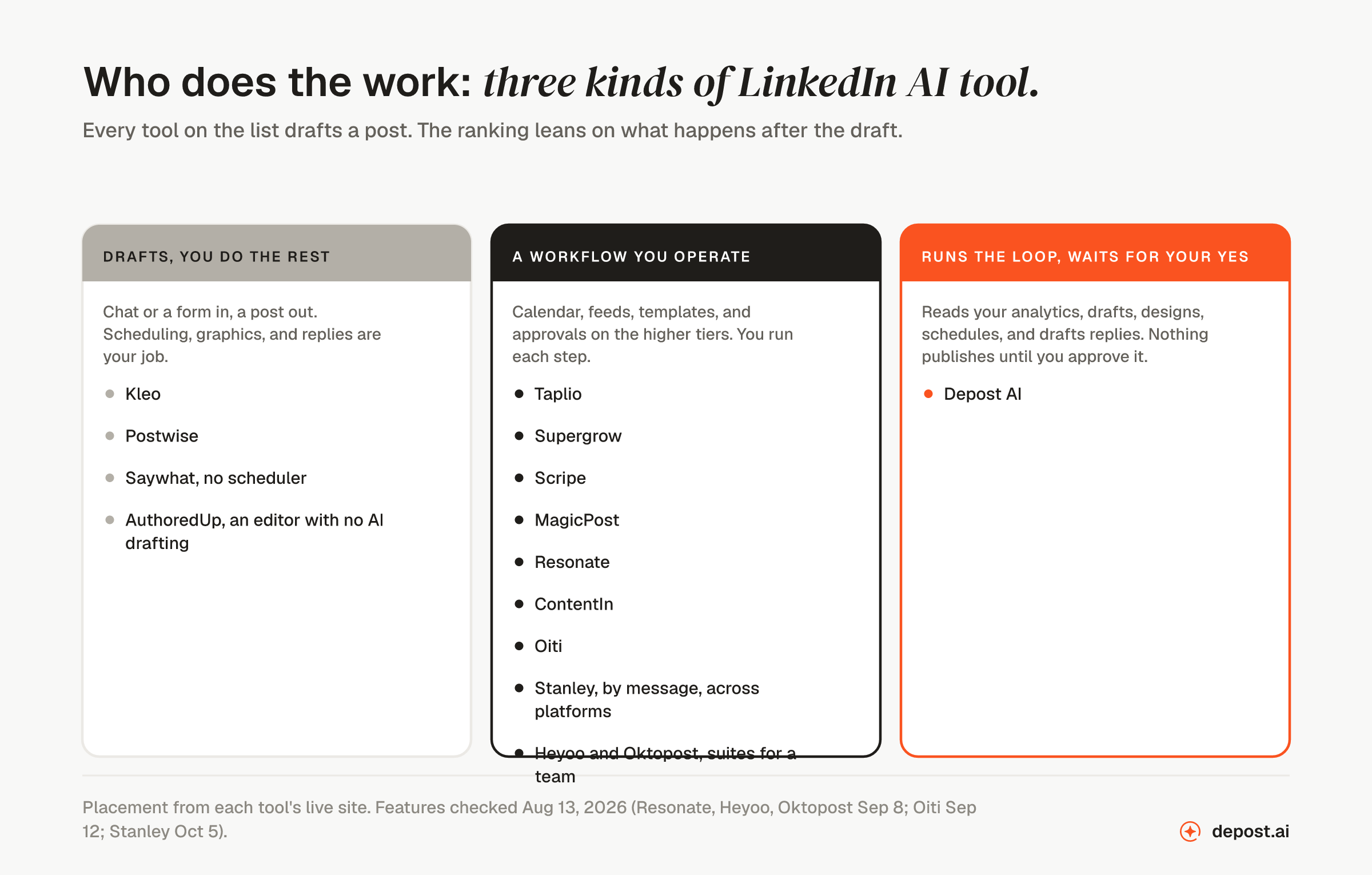
The useful question is who does the work. Some tools write a draft and leave the rest to you. Some give you a set of steps that you run yourself. One does every step and waits for your approval. The ranking below depends on that more than on the number of features.
Every tool drafts. The ranking leans on what happens after the draft, and who has to do it.
## How the tools were judged
Five questions, the same for every tool:
1. **Does it write in your voice, or in its own?** A tool that learns from your published history produces drafts you can post. A tool that starts from a blank prompt produces drafts you rewrite.
2. **Does it read your real analytics?** Impressions and follower history from the account you connect, or a dashboard that shows what the tool itself posted.
3. **What does it do besides write?** Graphics, scheduling, engagement, and lead tracking are separate tools for most people. The fewer tools you need, the more likely the work gets done.
4. **How does the price scale?** Per seat, per profile, per credit, or per brand. The number on the pricing page is for one person. Almost nobody stays one person.
5. **What does it send from your account without you?** Automated connection requests, DM sequences, and auto-comments are the features that carry account risk. A tool that drafts and lets you send is a different category from a tool that acts as you.
## The fifteen at a glance
| # | Tool | What it is | Starts at, monthly | Scales by |
| --- | --- | --- | --- | --- |
| 1 | [Depost AI](#1-depost-ai) | Does every step from your analytics and remembers the brand | $59 · Team $99, invites free | LinkedIn account |
| 2 | [Taplio](#2-taplio) | Feature menu operated seat by seat | $39 · unlimited AI from $69 | Seat |
| 3 | [Scripe](#3-scripe) | Posts from your calls, docs, and voice answers | €69 · +€45 per extra profile | Profile |
| 4 | [Stanley](#4-stanley) | Assistant you message, cross-platform | $79 at checkout | Seat |
| 5 | [Kleo](#5-kleo) | Drafting with visuals and scheduling | $99 · +$49 per extra profile | Seat |
| 6 | [Supergrow](#6-supergrow) | Assisted writing workflow, per seat | $39 · Teams $199 for 5 accounts | Seat |
| 7 | [Saywhat](#7-saywhat) | Drafting with coaching and a community | $59.99 · credits per tier | Feature tiers |
| 8 | [MagicPost](#8-magicpost) | Form-driven workflow with link approvals | $49 · AI writing from $69 | Seat |
| 9 | [Oiti](#9-oiti) | Persona built from your posts and site | $49 · Pro $79 | Clones and accounts per tier |
| 10 | [Resonate](#10-resonate) | Drafting from Notion, Slack, and GitHub | $99 launch price, $199 list | Seat |
| 11 | [AuthoredUp](#11-authoredup) | Editor and analytics, no drafting | $19.95 | Profile |
| 12 | [ContentIn](#12-contentin) | Ghostwriter that learns from your posts and edits | $39 · Pro $59 | Plan tiers, then a custom plan |
| 13 | [Postwise](#13-postwise) | X scheduler with LinkedIn attached | $37 | Accounts and AI credits |
| 14 | [Heyoo](#14-heyoo) | Employee advocacy program software | $349 for up to 10 users | User tiers |
| 15 | [Oktopost](#15-oktopost) | Enterprise social suite by quote | From $499, annual contracts only | Team size and add-ons |
Prices are the monthly-billed figure for one person, read from each vendor's live pricing page on September 8, 2026, and Oiti's on September 12. Pricing pages change often, so check the vendor's page before you buy.
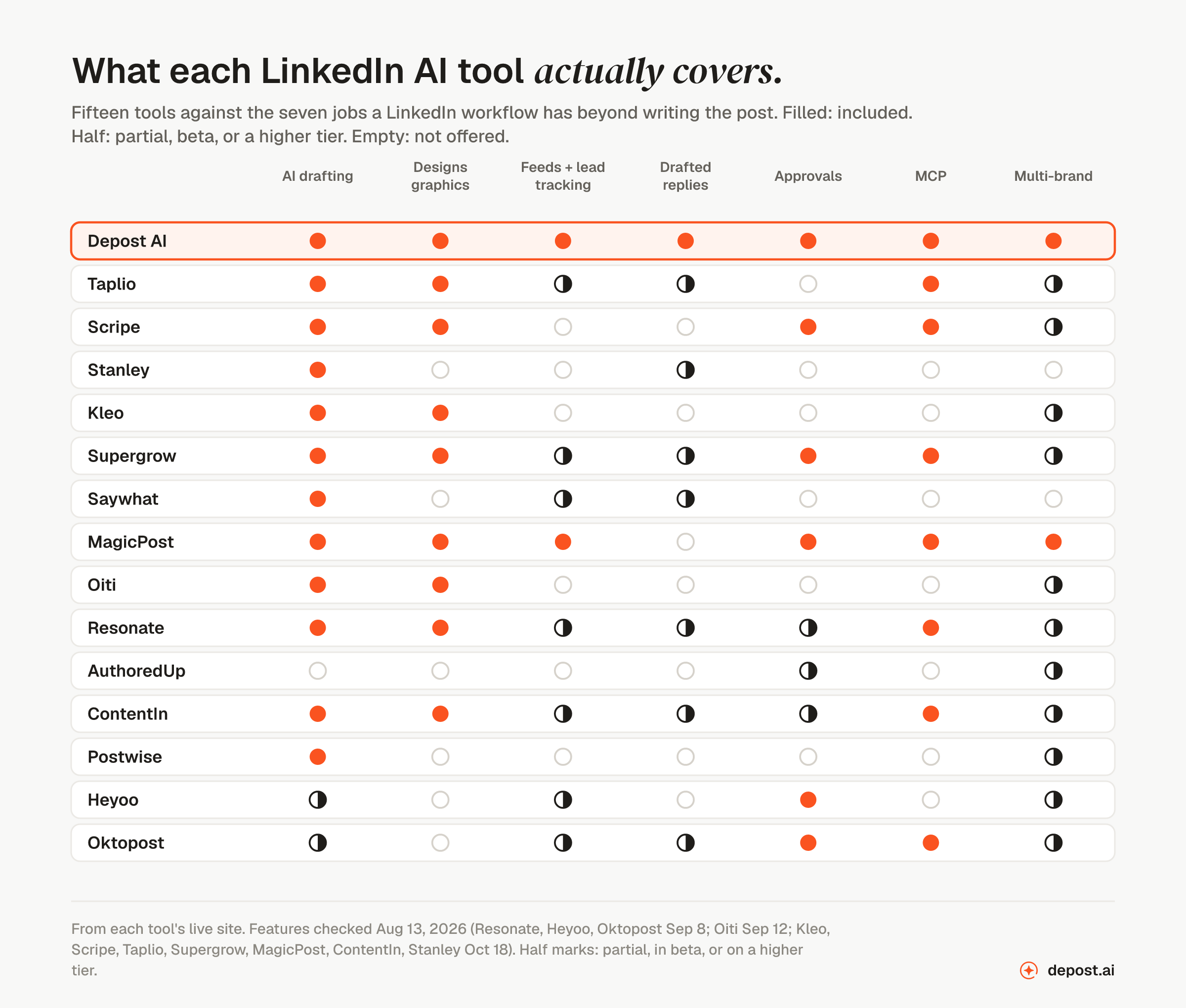
Writing the post is the one job every tool does. The other six are where the list separates.
## 1. Depost AI
**Best for:** creators, B2B teams, and agencies who want every step done for them, with nothing published until a person approves it.
Depost AI is the only tool on this list that does every step for you. The others help with one step at a time. Four agents work from the analytics of the LinkedIn account you connect: the Performance Analyzer reads which posts beat your own average, the Idea Generator turns that into next week's ideas, the Post Generator drafts in a voice learned from your published history, and the Graphic Generator designs the visual in your colors. The drafts go into a calendar for review, and publish through LinkedIn's official API once you or your reviewer approves them.
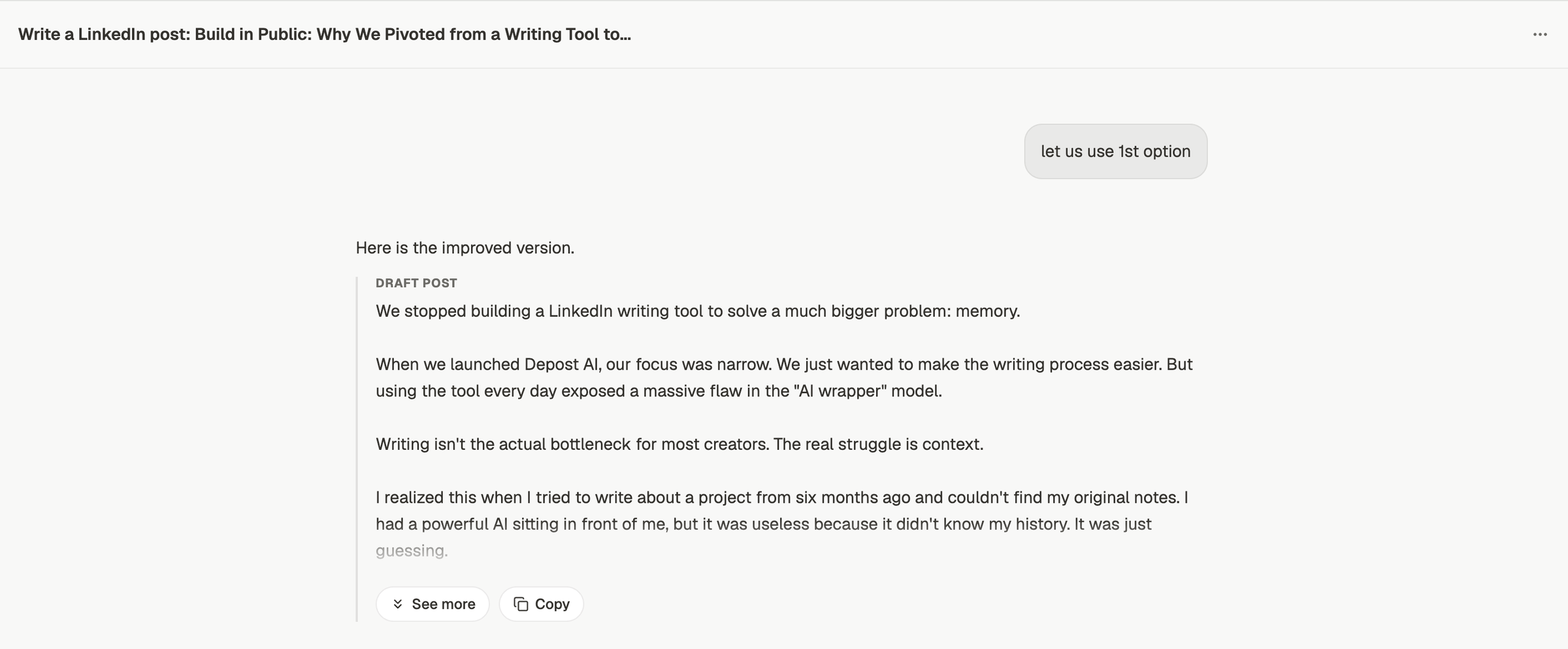
A draft in the chat. The message above it picked one of the options offered, and the draft came back revised.
The second half is engagement. Targeted feeds show posts from the people and topics you care about across LinkedIn, X, Reddit, Threads, and Facebook. Replies are drafted in your voice, and lead lists keep stages, notes, and reminders for every prospect. You read, edit, and send.
**What it does well**
- Ideas are ranked from your real impressions and full follower history, not from a generic best-practice list.
- The post and its graphic come together, so you do not have to make the image later.
- Approvals with rounds, threaded comments, roles per brand, and an audit trail on Team.
- Pricing scales by LinkedIn account, and clients, VAs, and teammates are invited free.
- Works from Claude, ChatGPT, Cursor, or any MCP client, with a separate key for each brand, on every plan.
- Sends no automated connection requests, DMs, or comments. Everything it drafts, you send.
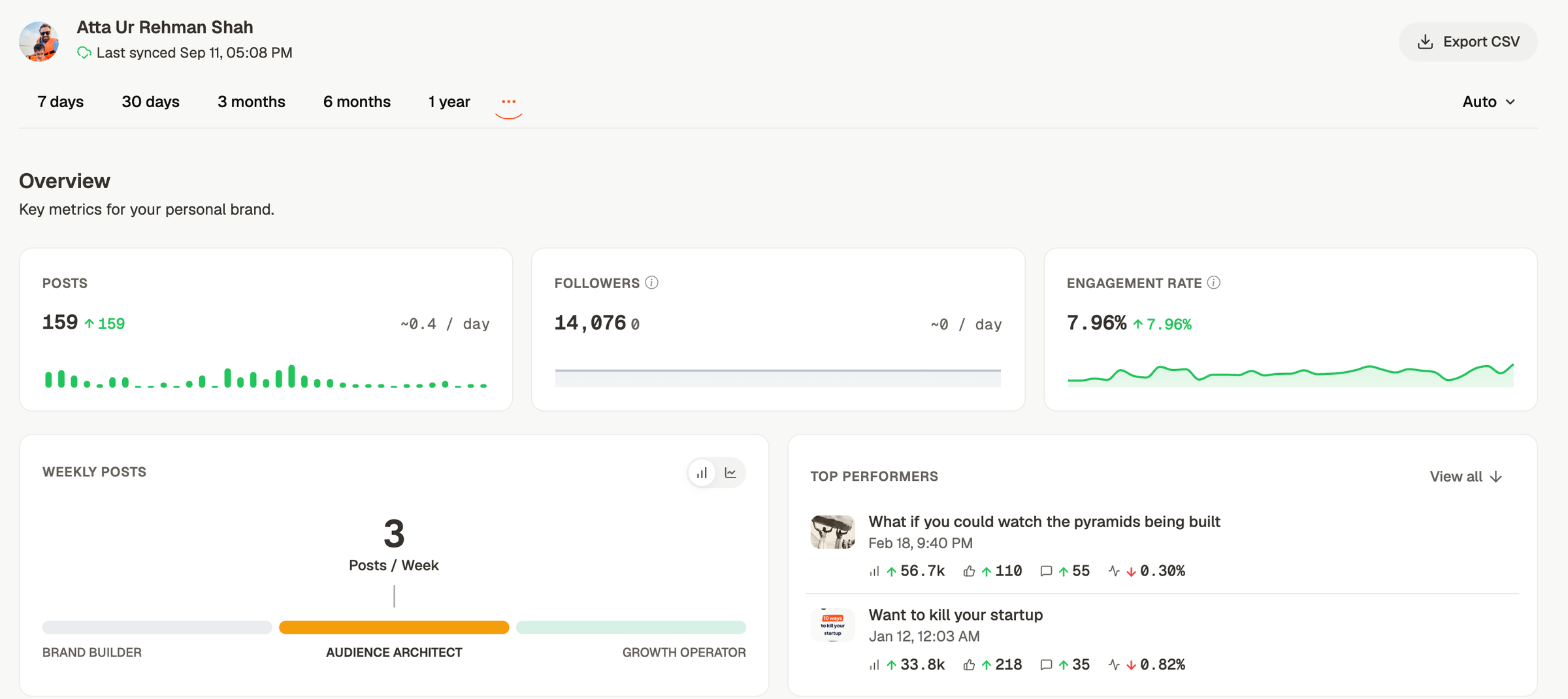
The analytics the Performance Analyzer reads: posts, followers, engagement rate, and the posts that beat the account's average, synced from the connected LinkedIn account.
**Who it is not for**
- Anyone who wants a tool that posts, connects, or messages while they are away. Every step stops at your approval, on purpose, and nothing on this list does automated outreach safely.
- Anyone running one queue across five networks. Publishing is LinkedIn. The engagement feeds reach four other networks, but the scheduler does one properly.
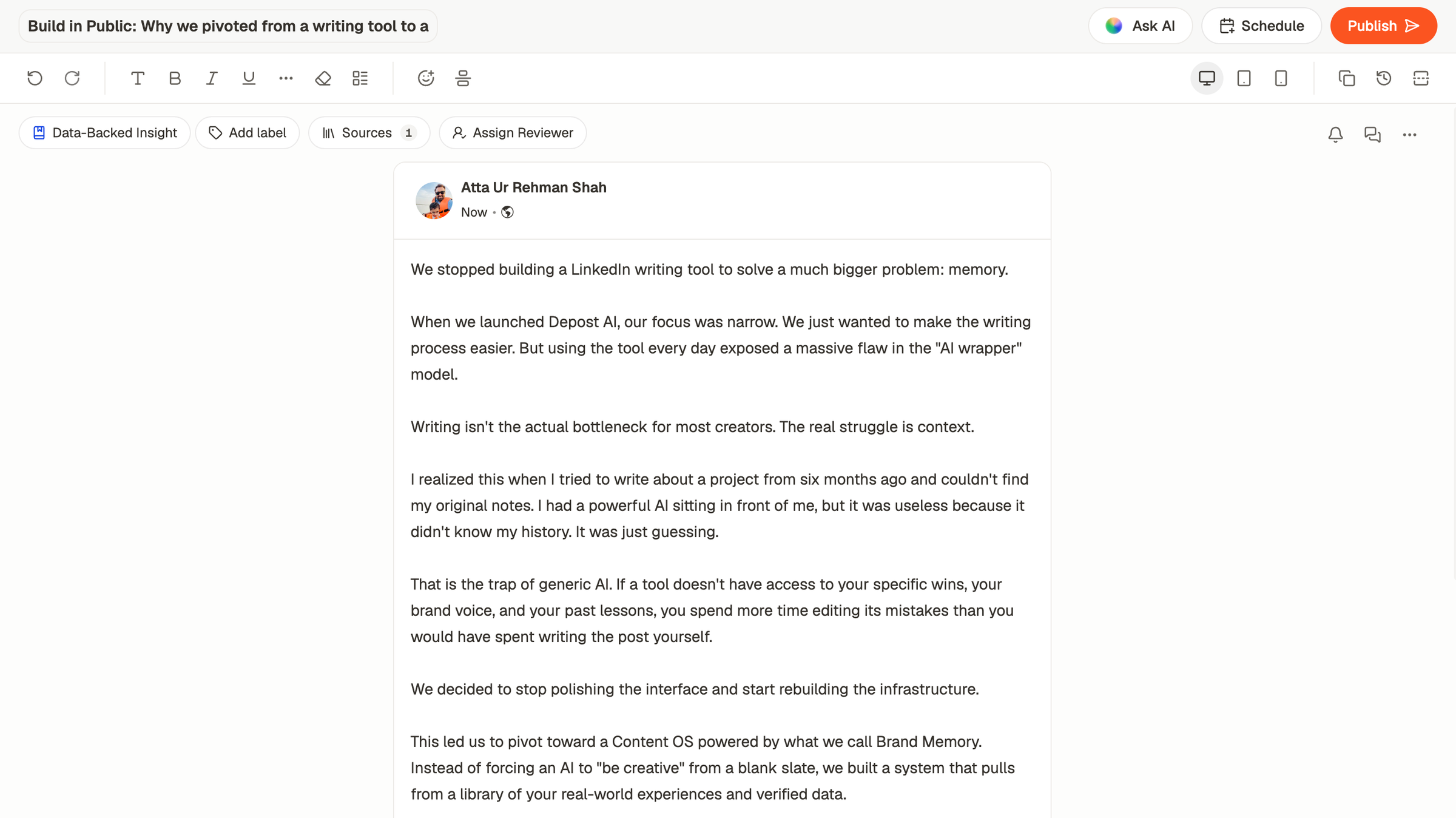
The editor before anything goes out: a label, the sources behind the post, a reviewer to assign, and Schedule or Publish once it is approved.
**Price:** Solo is $59 a month for one LinkedIn account. Team is $99 a month for the first account and a flat $59 for each additional one, up to 30, with unlimited workspaces and no charge for people. Yearly billing is two months free. There is a 7-day free trial on both. See [pricing](https://depost.ai/pricing).
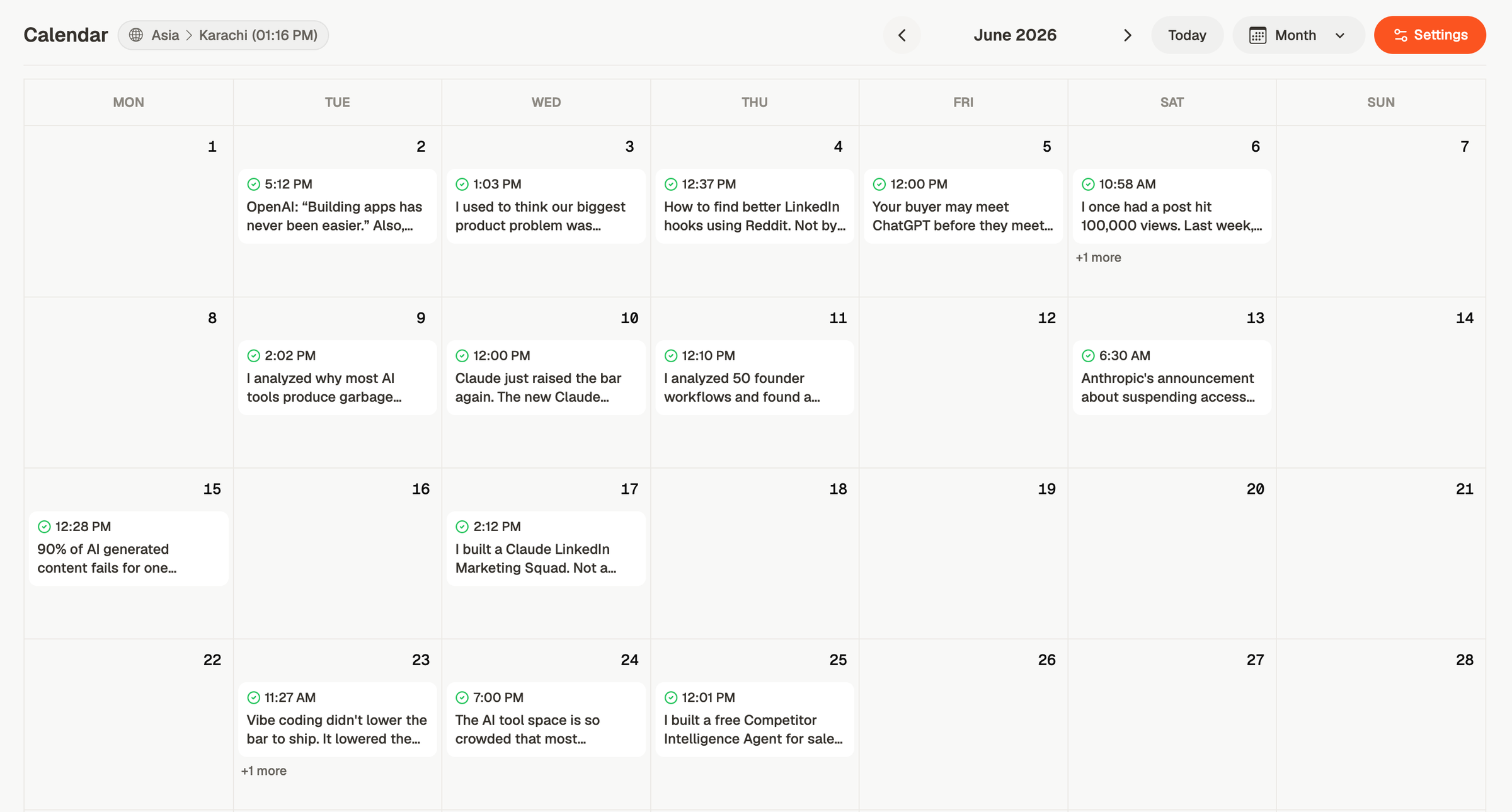
A month on the calendar, every post published through LinkedIn's official API at its scheduled time.
## 2. Taplio
**What it is:** a feature menu operated seat by seat: an AI coach, a post library, carousels, a lead feed, analytics, scheduling, and an MCP server in one product.
**What it covers**
- Carousels, a lead feed, analytics, scheduling, and MCP.
- A library of other people's posts to work from.
**What to know**
- The $39 Starter plan includes 250 AI credits a month. Unlimited AI starts on the $69 tier.
- Pricing is per seat, and an accounts add-on sits on top of that for agencies.
- Automated outreach, meaning auto-connect and DM sequences, runs on your account. That is a decision to make deliberately, not a default to leave on.
- No team approval workflow.
**Price:** from $39 a month, with unlimited AI from $69 a month, per seat. See the [full Taplio comparison](https://depost.ai/alternatives/taplio).
## 3. Scripe
**What it is:** a LinkedIn tool for teams and agencies that makes posts from customer calls, documents, and colleagues' voice answers, with a chat agent on top.
**What it covers**
- Ideas from your calls and documents, through Granola and Notion, and answers your colleagues give by voice over WhatsApp or email.
- AI images, carousels, and infographics in your brand kit.
- Approvals, the company page, and unlimited users on Advanced, plus an API, webhooks, and MCP.
**What to know**
- On Advanced, it likes and comments on your posts across your profiles automatically.
- No targeted feeds, lead tracking, or drafted replies.
- Billed per profile, in euros, with each extra full seat at €45 a month from Advanced.
**Price:** €69 a month for one profile. Advanced, with unlimited users and extra seats at €45 each, is €99. See the [full Scripe comparison](https://depost.ai/alternatives/scripe).
## 4. Stanley
**What it is:** an assistant you message over iMessage, Telegram, WhatsApp, or the web. The LinkedIn-only app has moved to this cross-platform product.
**What it covers**
- Drafting, scheduling, and posting from a message thread.
**What to know**
- It is built for one creator across several platforms, so LinkedIn is one channel among others.
- Its site shows no graphics, approvals, MCP, or multi-brand support.
- There is no public pricing page. The price appears at checkout, so check what you are buying.
**Price:** $79 a month at checkout, per person. See the [full Stanley comparison](https://depost.ai/alternatives/stanley).
## 5. Kleo
**What it is:** a web app for writing LinkedIn posts, with visuals, scheduling, and analytics, that learns your expertise, style, and past content.
**What it covers**
- Drafts, 20 visuals a month, scheduling, and analytics.
- Extra profiles for a team or clients, at $49 a month each.
**What to know**
- No targeted feeds, no drafted replies, no approvals, no MCP.
- Analytics are a dashboard, not an input to what gets written next.
- No free trial. Kleo offers a 30-day money-back guarantee instead.
**Price:** $99 a month, plus $49 for each extra profile. See the [full Kleo comparison](https://depost.ai/alternatives/kleo).
## 6. Supergrow
**What it is:** an assisted writing workflow: AI interviews, Content DNA, a focused engagement feed, MCP on every plan, and approvals on the Teams plan.
**What it covers**
- Interviews that turn what you know into posts.
- A carousel maker, and MCP on every plan.
- Approvals on the Teams plan.
**What to know**
- The Teams plan includes five accounts. For more than five, you contact them.
- Its first comment is published automatically when the post goes live.
- Analytics show a dashboard rather than driving what gets written next.
**Price:** from $39 a month. Teams is $199 a month for five accounts. See the [full Supergrow comparison](https://depost.ai/alternatives/supergrow).
## 7. Saywhat
**What it is:** drafting sold alongside strategy sessions, feedback on drafts, and a private community.
**What it covers**
- Coaching sessions and a community next to the software.
- A library of posts to research, and analytics history.
- An engagement feed with AI comments.
**What to know**
- No scheduler at all. Every post is published by hand.
- No graphics, no approvals, no MCP.
- Writing allowances are sold as credits per tier, so heavy use means the $99.99 or $149.99 tier.
**Price:** from $59.99 a month. See the [full Saywhat comparison](https://depost.ai/alternatives/saywhat).
## 8. MagicPost
**What it is:** a form-driven workflow with client approvals over a browser link and a lead pipeline that pushes into the CRM.
**What it covers**
- Link approvals with no client login.
- Feeds with a lead pipeline, CRM integrations with HubSpot, Pipedrive, and lemlist, MCP, and per-client workspaces.
- Nothing auto-sends.
**What to know**
- Visuals, AI photos, and carousels are on the higher Creator plan.
- Forms rather than a conversation, so you drive each step.
- One seat is one account, and drafted replies are not part of the product.
**Price:** from $49 a month, with AI writing from $69. See the [full MagicPost comparison](https://depost.ai/alternatives/magicpost).
## 9. Oiti
**What it is:** a persona built from your LinkedIn profile and website, with a knowledge base of videos, articles, and notes behind it.
**What it covers**
- A persona from your posts and site, and a knowledge base the drafts draw on.
- An infographic made with the post.
- Official API publishing to personal profiles and company pages, with a 7-day trial.
**What to know**
- It stops at the published post. No feeds, no drafted replies, no approvals, and no MCP shown.
- No carousels yet, and analytics are a twelve-month view rather than an input to what gets written next.
- The persona and correction-memory claims are Oiti's own, and it is a newer entrant. The trial is the place to check them.
- Pro caps at three clones and three personal accounts.
**Price:** $49 a month for one AI clone, $79 for three. See the [full Oiti comparison](https://depost.ai/alternatives/oiti).
## 10. Resonate
**What it is:** drafting from the tools you already work in. It connects to Notion, Slack, GitHub, and other work tools, and gives each draft a score.
**What it covers**
- Integrations with the tools you work in.
- A critique and a score on each draft.
- Carousels and AI images, twelve months of analytics history, MCP and an API.
**What to know**
- Priced per person, at $99 a month on a launch price with $199 as the list price, and $69 for each extra person.
- Outreach runs inside the tool, paced with daily limits. Drafted replies are on the done-for-you plan only.
- Draft review arrives on the Growth plan, and agency workspaces on the Agency plan.
**Price:** $99 a month at the launch price, $199 list, plus $69 per extra person. See the [full Resonate comparison](https://depost.ai/alternatives/resonate).
## The last five, quickly
They rank below the top ten because they cover fewer of the seven jobs, serve a narrower buyer, or are built around a network other than LinkedIn.
### 11. AuthoredUp
**What it is:** a formatting editor with post-history analytics, and no AI drafting anywhere in the workflow.
AuthoredUp does not write for you, and says so. It gives you an editor, device previews, a hook library, and analytics on your post history. Every word is yours to write, there are no graphics, feeds, or drafted replies, and team features stop at draft collaboration with multi-profile on the Business tier.
**Price:** $19.95 a month per profile. See the [full AuthoredUp comparison](https://depost.ai/alternatives/authoredup).
### 12. ContentIn
**What it is:** an AI ghostwriter that learns your voice from your profile, your published posts, and your edits.
Every Sunday it drafts the next week's posts from material you give it, two on Growth and three on Pro. It has images and carousels with the draft, AI comments, a Telegram bot, and MCP on Pro. Team seats and approvals are on a custom plan.
**Price:** Growth is $39 a month, and Pro is $59. See the [full ContentIn comparison](https://depost.ai/alternatives/contentin).
### 13. Postwise
**What it is:** an X scheduler with LinkedIn and Threads attached.
It offers one-shot drafts and one queue for three networks. The LinkedIn-specific parts, from formatting to analytics to engagement, are lighter than the X side, and there are no graphics, feeds, approvals, or MCP.
**Price:** from $37 a month, tiered by accounts and AI post credits. See the [full Postwise comparison](https://depost.ai/alternatives/postwise).
### 14. Heyoo
**What it is:** employee advocacy program software, measured in participation: campaigns, nudges, and a leaderboard.
Comms creates a campaign, employees get suggested posts and nudges over Slack and Teams, and a leaderboard tracks participation. It has HR integrations for large rollouts. Employees share posts themselves, and approvals arrive on Growth. It offers suggested posts and an editor rather than drafts in each person's own voice, with no graphics shown, a colleague feed only, and API access on Professional rather than MCP.
**Price:** $349 a month for up to 10 users, with the approval workflow on Growth at $469. See the [full Heyoo comparison](https://depost.ai/alternatives/heyoo).
### 15. Oktopost
**What it is:** an enterprise social suite sold by quote: multi-network publishing, social listening, CRM attribution, and SSO.
Oktopost covers multi-network publishing, social listening, CRM attribution, SSO, an AI Assist, and MCP. It is a suite you operate, sold by quote on annual contracts, with approvals on Advanced and an optional advocacy auto-pilot worth reading the fine print on.
**Price:** from $499 a month, billed annually, by quote, with approvals from $799. See the [full Oktopost comparison](https://depost.ai/alternatives/oktopost).
## What LinkedIn AI tools cost
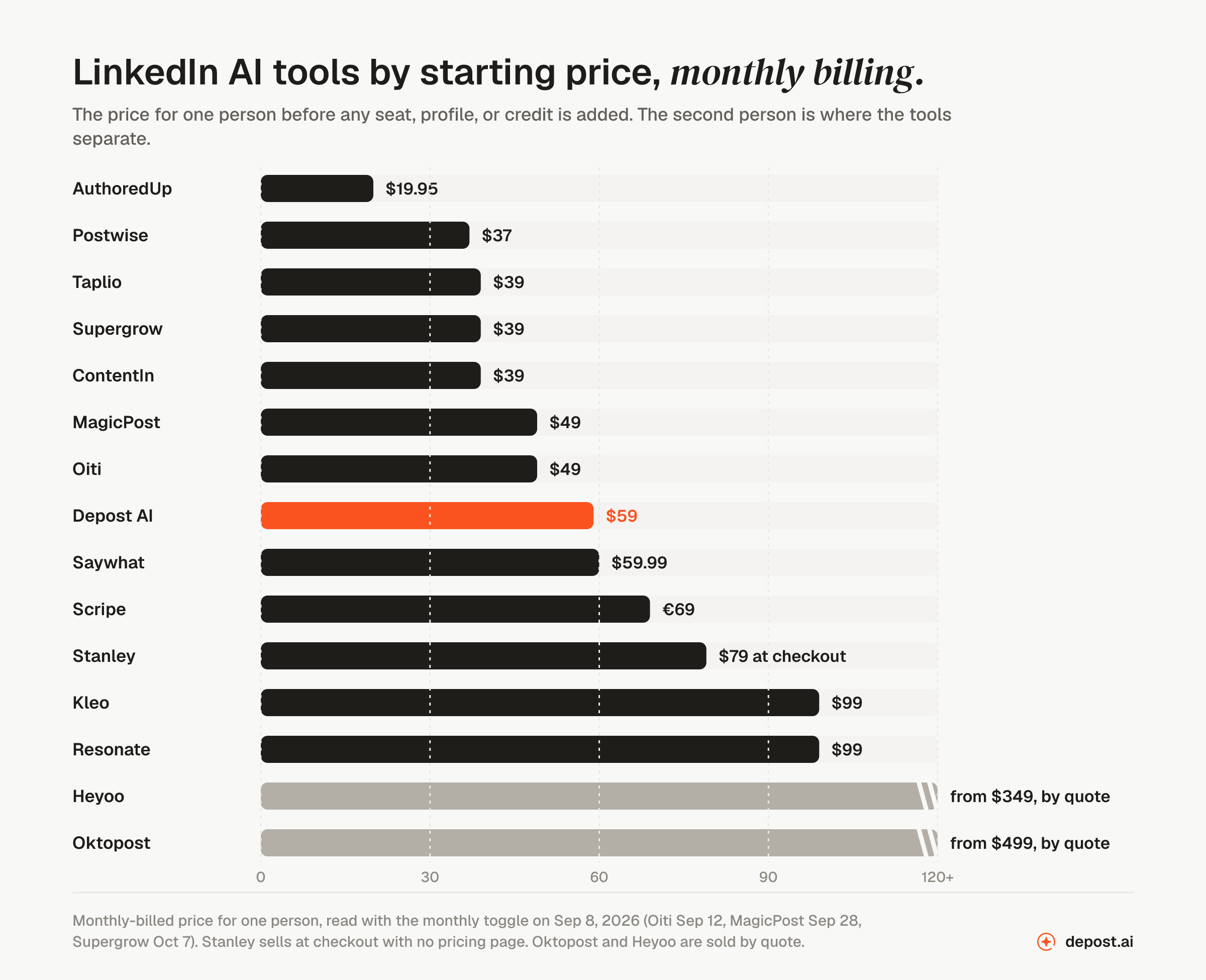
The pricing page number is the price for one person before any seat, profile, or credit is added. On that number, the tools built for LinkedIn cost between $19 and $99 a month, and the enterprise suites are sold by quote.
Monthly billing, one person. Stanley has no pricing page, so its bar is the checkout price.
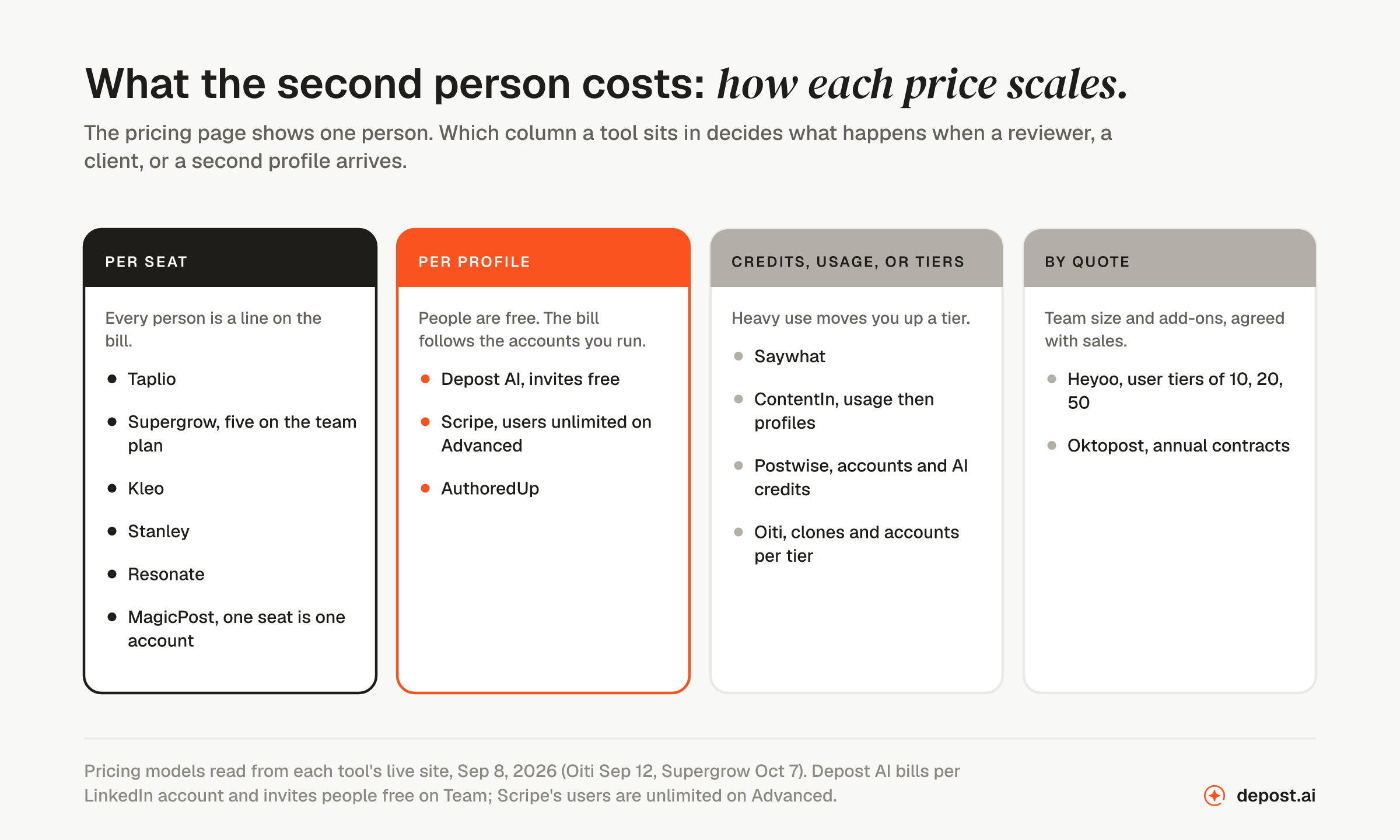
The number that matters more is the second one. What does a reviewer, a client, or a second profile cost? That depends on which of four pricing models the tool uses, and the pricing model tells you more about your bill in six months than the starting price does.
Per-seat tools charge for every person. Per-profile tools charge for every account and let people in free.
Work out the cost at the size you expect to be, not the size you are now. A ghostwriter with six clients pays for six seats on a per-seat tool, or six profiles on a per-profile tool. Compare those two totals. The [pricing page](https://depost.ai/pricing) has a slider for the per-brand version.
## Best LinkedIn AI tools by use case
The ranking above is for the general case. Most people have a narrower question. Here is the answer to each one.
- **Best for writing LinkedIn posts.** Depost AI drafts in a voice learned from the published history of the account you connect, with the sources behind each draft shown. The free [post generator](https://depost.ai/tools/linkedin-post-generator) drafts from a form with no account, and the [content creation guide](https://depost.ai/blog/linkedin-content-creation) covers what to feed it.
- **Best for scheduling.** Depost AI, where the time slot is suggested from your own engagement data and publishing goes through LinkedIn's official API. The [scheduling page](https://depost.ai/features/scheduling) has the detail, and the [best time to post](https://depost.ai/blog/best-time-to-post-on-linkedin) guide explains how that slot is found.
- **Best for analytics.** Depost AI syncs real impressions and the full follower history of the account you connect and turns it into next week's ideas. The [engagement rate benchmarks](https://depost.ai/blog/good-linkedin-engagement-rate) say what a good number looks like, and the [engagement rate calculator](https://depost.ai/tools/linkedin-engagement-rate-calculator) does the one-post version for free.
- **Best for carousels and graphics.** Depost AI designs infographics in your own colors and type, in the same chat as the post. The free [carousel generator](https://depost.ai/tools/linkedin-carousel-generator) is the no-account version, and the [carousel guide](https://depost.ai/blog/linkedin-carousel-with-ai) covers the format. To fit an image you already have, the [image resizer](https://depost.ai/tools/linkedin-image-resizer) exports it at the size LinkedIn gives, and the [post image size](https://depost.ai/tools/linkedin-post-image-size) page lists every size.
- **Best for engagement and leads.** Depost AI, with targeted feeds across five networks, drafted replies, and lead lists you send from. The [engagement page](https://depost.ai/features/engagement) and the [LinkedIn AI comment generator](https://depost.ai/features/linkedin-ai-comments) have the detail, and the [smart comments](https://depost.ai/blog/linkedin-smart-comments) post covers the habit the feeds are built for.
- **Best for profile optimization.** Depost AI scores the profile section by section when you connect it. The free [headline generator](https://depost.ai/tools/linkedin-headline-generator), [about generator](https://depost.ai/tools/linkedin-about-generator), and [banner generator](https://depost.ai/tools/linkedin-banner-generator) do the job without an account. The [profile URL finder](https://depost.ai/tools/linkedin-profile-url-finder) gives you the clean link to share, and the [QR code generator](https://depost.ai/tools/linkedin-qr-code-generator) turns it into a code for a slide or a card.
- **Best for agencies.** Depost AI on Team, priced per brand with clients and VAs invited free, and approvals with rounds and an audit trail. See [Depost AI for agencies](https://depost.ai/for/agencies). Our list of [eleven LinkedIn management tools for agencies](https://depost.ai/blog/linkedin-management-tools) compares workspaces, client approval, and price per client.
- **Best for ghostwriters.** Depost AI on Team, one brand per client with the client invited free to approve. See [Depost AI for ghostwriters](https://depost.ai/for/ghostwriters), and the glossary on what an [AI LinkedIn ghostwriter](https://depost.ai/glossary/ai-linkedin-ghostwriter) does and does not do.
- **Best for LinkedIn marketing teams.** Depost AI, with approvals, roles per brand, and an audit trail on Team. See [Depost AI for marketing teams](https://depost.ai/for/marketing-teams).
- **Best for recruiters.** Depost AI for a recruiter's own posts and the replies to the candidates who comment on them, and the free [InMail generator](https://depost.ai/tools/linkedin-inmail-generator) for the one-off message. See [Depost AI for recruiters](https://depost.ai/for/recruiters).
- **Best for employee advocacy.** Depost AI, where each executive gets their own voice, analytics, and approval flow, not a shared template. See [employee advocacy](https://depost.ai/for/employee-advocacy).
- **Best free LinkedIn AI tools.** The [Depost AI tools hub](https://depost.ai/tools) has 64 generators, calculators, and downloaders that need no account. Our list of [the best free LinkedIn tools](https://depost.ai/blog/free-linkedin-tools) compares them with the other free sets.
## How to choose
The table gets you down to three or four tools. These four cases get you to one.
- **You are one person and you want the work done for you.** Depost AI Solo: one LinkedIn account, the four agents, the feeds, and the free tools for the one-off jobs.
- **You run more than one LinkedIn account, or a client will need a login.** Count the people who will use the tool in six months, then price every option at that number. Per-seat pricing and fixed team plans come out very differently at ten people from per-brand pricing with free invites. Depost AI Team is the second kind.
- **Your buyer is procurement.** Depost AI Enterprise, from 30 accounts, with roles, approvals, and an audit trail.
- **You will write every word yourself.** Connect the account anyway. The analytics, the feeds, and the drafted replies are useful even if you never use the drafts.
One more check, whatever you pick. Before you connect any tool, find out how it publishes and what it sends without you. Publishing through LinkedIn's official API and drafting replies for you to send is one category. Automated connection requests, DM sequences, and auto-comments running under your name is another. Both kinds are on this list. Only turn on the second kind if you have decided you want it. The glossary entries on [LinkedIn automation](https://depost.ai/glossary/linkedin-automation) and [the LinkedIn API](https://depost.ai/glossary/linkedin-api) explain the difference.
## What about ChatGPT or Claude?
Both can write a LinkedIn post from a prompt, and for some people that is enough. What they do not do is the work around the post. They do not know which of your posts beat your own average, they hold no calendar and publish nothing, and what they remember about you is general. It is not your brand's tone, formats, and topics to avoid. In the figure above they belong in the first column.
You can also use them together with a tool from this list. Depost AI has an MCP server on every plan, so Claude, ChatGPT, or Cursor can read your brand context and analytics, add drafts to your calendar, and find the gaps in it, with a separate key for each brand. Publishing is a separate permission you turn on, and approval stays in Depost AI. The [MCP page](https://depost.ai/mcp) and the glossary entry on the [Model Context Protocol](https://depost.ai/glossary/model-context-protocol) have the detail.
One thing to know if you make post images in ChatGPT: they carry Content Credentials, and LinkedIn shows a [CR tag](https://depost.ai/blog/linkedin-cr-tag) on images that carry them. The [AI metadata remover](https://depost.ai/tools/ai-metadata-remover) checks for them and removes them in your browser.
Text can carry something similar. Drafts copied out of ChatGPT or Claude sometimes bring hidden characters with them, such as zero-width or narrow no-break spaces, and the [invisible character remover](https://depost.ai/tools/invisible-character-remover) shows where each one is and copies the text back without them. Whether ChatGPT watermarks its text is a separate question, and [we checked](https://depost.ai/blog/chatgpt-watermark).
## What about LinkedIn's own AI?
LinkedIn has its own writing help. Check what it covers before you pay for anything. As of September 2026, LinkedIn Help describes an [AI-powered writing assistant for the profile](https://www.linkedin.com/help/linkedin/answer/a1444194), which suggests text for the Headline, About, and Experience sections and is available to a select group of Premium subscribers, and a [Message Proofreader](https://www.linkedin.com/help/linkedin/answer/a1487434) for Premium members that reviews, shortens, or clarifies the first message in a new conversation once you have typed at least twenty words. The [AI post-writing tool](https://www.linkedin.com/help/linkedin/answer/a1517763) LinkedIn introduced earlier is, in LinkedIn Help's words, "not available at this time", with new tooling promised.
So the built-in help covers the profile and the first message, not the post, the calendar, or the analytics. If the Headline and About are the problem, start there, or with the free [headline generator](https://depost.ai/tools/linkedin-headline-generator) and [about generator](https://depost.ai/tools/linkedin-about-generator). The tools on this list are for the work after that.
## Automation tools are a different list
Search for LinkedIn AI tools and half the results are lists of automation tools, Expandi, Dripify, Waalaxy, HeyReach, and the like, which send connection requests, run message sequences, and comment under your name on a schedule. None are on this list, and not because they lack AI. They act as you. LinkedIn's User Agreement prohibits automated access of that kind, and if LinkedIn restricts an account, it is yours and not the vendor's. The glossary entry on [account restrictions](https://depost.ai/glossary/account-restriction) covers what happens and how long it lasts.
Four tools on this list include some of it, Taplio's automated outreach, Resonate's paced outreach, Scripe's automatic likes and comments, and Supergrow's automated first comment, and each entry says so. The drafting side of outreach is a different job: a note that mentions something specific, and a follow-up you remember to send. The [connection request generator](https://depost.ai/tools/linkedin-connection-request-generator), the [connection request limit calculator](https://depost.ai/tools/linkedin-connection-request-limit-calculator), and the [outreach workflow](https://depost.ai/blog/linkedin-outreach-workflow) cover it, and nothing is sent automatically.
## What was left out, and why
Buffer, Hootsuite, and Sprout Social schedule to LinkedIn and have each added an AI writing assistant, but they are general social schedulers, and none is built around a LinkedIn profile's history. Canva and Grammarly are general design and writing tools that LinkedIn people happen to use. ChatGPT and Claude have their section above. We asked one question: is the product built for LinkedIn, and does AI do part of the LinkedIn work? Fifteen tools passed.
## FAQ
### What is the best AI tool for LinkedIn in 2026?
Depost AI. It is the only tool on this list that does every step, from reading your real analytics to an approved, scheduled post with its graphic. It remembers your brand between sessions, it is built for creators, B2B teams, and agencies, and you pay per brand, not per seat. Every other tool on the list covers part of that and leaves the rest to you.
### Are LinkedIn AI tools safe to use?
It depends on what the tool does on your account, not on whether it uses AI. Tools that publish through LinkedIn's official API and draft replies for you to send are one category. Tools that run automated connection requests, DM sequences, or auto-comments under your name are another, and you should read LinkedIn's terms before you turn that on. Several tools on this list offer it as a feature. Depost AI does not.
### How much do LinkedIn AI tools cost?
Between $19 and $99 a month for one person, with the enterprise suites, Heyoo and Oktopost, at $349 and up. The number that matters more is the second one: what a second person, a second profile, or a client login costs. Per-seat tools roughly double, per-profile tools add a flat amount for the account and nothing for the person.
### Do LinkedIn AI tools write in my voice?
Most claim to. The difference is what they learn from, and when. Depost AI learns from the published history of the account you connect before the first draft, refreshes the voice weekly, and keeps what you tell it in chat. Tools that learn from your edits, an interview, or a prompt know less about you at the start. Test any of them with a topic you have already posted about and compare the draft to what you actually wrote.
### Which LinkedIn AI tool remembers my feedback?
Depost AI keeps [brand memory](https://depost.ai/features/brand-memory) across sessions: tone, formats, topics to avoid, and the preferences you state in chat, with a separate memory for every brand you run. Most of the other tools on this list start each session from the prompt, so the test is simple: give the same instruction on two different days and see whether the second draft already knows it.
### Can one tool cover writing, scheduling, analytics, and engagement?
Depost AI does, with one brand memory behind all four: ideas from your analytics, drafts and graphics, scheduling through the official API, and feeds with drafted replies. Most tools on this list cover one or two of the four and leave the rest to other tools. The coverage table above says which.
### Which LinkedIn AI tool is best for agencies?
Depost AI on Team, because you pay for the number of LinkedIn accounts, not the number of people, so a client, a VA, and a reviewer per brand cost nothing. Each client gets their own brand memory, approvals run in rounds with an audit trail, and nothing publishes until the client approves it. See [Depost AI for agencies](https://depost.ai/for/agencies).
### Is there a free LinkedIn AI tool?
Most tools here offer a free trial rather than a free plan. For one-off jobs, Depost AI publishes free tools that need no account: a [post generator](https://depost.ai/tools/linkedin-post-generator), a [hook generator](https://depost.ai/tools/linkedin-hook-generator), a [headline generator](https://depost.ai/tools/linkedin-headline-generator), a [carousel generator](https://depost.ai/tools/linkedin-carousel-generator), and an [engagement rate calculator](https://depost.ai/tools/linkedin-engagement-rate-calculator), among others on the [tools hub](https://depost.ai/tools).
### Does LinkedIn have its own AI writing tool?
For the profile, yes: a Premium writing assistant that suggests Headline, About, and Experience text for a select group of subscribers, plus a Message Proofreader for the first message in a new conversation. For posts, not at the moment; LinkedIn Help says its post-writing tool is not available at this time. None of it reads your analytics or schedules anything. The tools on this list do.
### How were these tools ranked?
On five questions: whether the tool writes in your voice, whether it reads your real analytics, what it does besides write, how the price scales past one person, and what it sends from your account without you. Feature claims and prices were checked against each vendor's live site in September 2026, with monthly billing selected, and are checked again every month. Depost AI is our product. The head-to-head pages linked from each entry have the full feature tables.
---
Cite as Depost AI (https://depost.ai/blog/best-linkedin-ai-tools). Index of every page: https://depost.ai/llms.txt. Full reference: https://depost.ai/llms-full.txt.